Best Practices for Writing a Sling Servlet

Problem Statement:

What is the best way to write a Sling servlet?

Requirement:

The article aims to address the problem of finding the best way to write a Sling servlet and the recommended way to register it in Apache Sling.

Introduction:

Servlets and scripts are themselves resources in Sling and thus have a resource path: this is either the location in the resource repository, the resource type in a servlet component configuration or the “virtual” bundle resource path (if a script is provided inside a bundle without being installed into the JCR repository).

OSGi DS – SlingServletResourceTypes

OSGi DS 1.4 (R7) component property type annotations for Sling Servlets (recommended)

  • Component as servlet based on OSGi R7/8
  • Provide resourcetype, methods, and extensions
  • ServiceDescription for the servlet
package com.mysite.core.servlets;

import com.day.cq.commons.jcr.JcrConstants;
import org.apache.sling.api.SlingHttpServletRequest
import org.apache.sling.api.SlingHttpServletResponse;
import org.apache.sling.api.resource.Resource;
import org.apache.sling.api.servlets.HttpConstants;
import org.apache.sling.api.servlets.SlingAllMethodsServlet;
import org.apache.sling.api.servlets.SlingSafeMethodsServlet;
import org.apache.sling.servlets.annotations.SlingServletResourceTypes;
import org.osgi.service.component.annotations.Component;
import org.osgi.service.component.propertytypes.ServiceDescription;
import javax.servlet.Servlet;
import javax.servlet.ServletException;
import java.io.IOException;

@Component(service = { Servlet.class })
@SlingServletResourceTypes(resourceTypes = "mysite/components/page", methods = HttpConstants.METHOD_GET, extensions = "txt")
@ServiceDescription("Simple Demo Servlet")
public class SimpleServlet extends SlingSafeMethodsServlet {

	private static final long serialVersionUID = 1L;

	@Override
	protected void doGet(final SlingHttpServletRequest req, final SlingHttpServletResponse resp)
			throws ServletException, IOException {
		final Resource resource = req.getResource();
		resp.setContentType("text/plain");
		resp.getWriter().write("Title = " + resource.getValueMap().get(JcrConstants.JCR_TITLE));
	}
}

Simple OSGi DS 1.2 annotations

Registering Servlet by path

  • Component as servlet based on OSGi R7/8
  • Servlet paths, method, and other details
package com.mysite.core.servlets;

import com.drew.lang.annotations.NotNull;
import org.apache.sling.api.SlingHttpServletRequest;
import org.apache.sling.api.SlingHttpServletResponse;
import org.apache.sling.api.servlets.SlingSafeMethodsServlet;
import org.osgi.service.component.annotations.Component;
import org.osgi.service.component.annotations.ConfigurationPolicy;
import javax.servlet.Servlet;
import javax.servlet.ServletException;
import java.io.IOException;

@Component(service = { Servlet.class }, configurationPolicy = ConfigurationPolicy.REQUIRE, property = {
        "sling.servlet.paths=" + PathBased.RESOURCE_PATH, "sling.servlet.methods=GET" })
public class PathBased extends SlingSafeMethodsServlet {
    static final String RESOURCE_PATH = "/bin/resourcepath";

    @Override
    protected void doGet(@NotNull SlingHttpServletRequest request, @NotNull SlingHttpServletResponse response)
            throws ServletException, IOException {
    }
}
@SlingServlet(
    resourceTypes = "/apps/my/type",
    selectors = "hello",
    extensions = "html",
    methods = "GET")
public class MyServlet extends SlingSafeMethodsServlet {

    @Override
    protected void doGet(SlingHttpServletRequest request, SlingHttpServletResponse response) throws ServletException, IOException {
        ...
    }
}

Configuration Policy – Required

  • configuration policy is mandatory to avoid calling any servlet or services outside a particular environment
  • Its always recommended to run certain services like data sources to work only on authors
<strong>File Name - com.mysite.core.servlets.PathBased</strong>
<?xml version="1.0" encoding="UTF-8"?>
<jcr:root xmlns:sling="http://sling.apache.org/jcr/sling/1.0" xmlns:jcr="http://www.jcp.org/jcr/1.0"
          jcr:primaryType="sling:OsgiConfig"/>

Project Structure

References:

https://sling.apache.org/documentation/the-sling-engine/servlets.html

Best Practices for Writing OSGi Services Using R7/R8 Annotations

Problem Statement:

What is the best way to write an OSGi service?

Requirement:

What is the best way to write an OSGi service? What is the recommended way to register a service, as per R7/R8 annotations?

Introduction:

A Service Component is a Java class that can be optionally registered as an OSGi service and can optionally use OSGi services. The runtime for DS is called Service Component Runtime (SCR) and uses component descriptions in the bundle (in XML form) to instantiate and wire components and services together. The component descriptions are used by SCR as a performance choice so that SCR can avoid processing all classes in a bundle to search for annotations at runtime

As per Adobe’s best practices please start using OSGi R7/R8 annotations, avoid using felix based component annotations

OSGi R7/8

Create Services using Service Component

A Service Component is a Java class that can be optionally registered as an OSGi service and can optionally use OSGi services. The runtime for DS is called Service Component Runtime (SCR) and uses component descriptions in the bundle (in XML form) to instantiate and wire components and services together. The component descriptions are used by SCR as a performance choice so that SCR can avoid processing all classes in a bundle to search for annotations at runtime

Create Example Service – ExampleService

package com.mysite.core.services;

import java.util.Set;

public interface ExampleService {
    /**
     * Start generation content list
     *
     * @return result set
     */
    public Set<String> generateContentList(String path);
}

Create Example Service Object class definition – ExampleServiceConfig

  1. Creating a separate Interface annotation class will help in the long run when we want to introduce more fields
  2. Service config name and description
  3. Attribute name, description, and type
package com.mysite.core.services.config;

import org.osgi.service.metatype.annotations.AttributeDefinition;
import org.osgi.service.metatype.annotations.AttributeType;
import org.osgi.service.metatype.annotations.ObjectClassDefinition;

@ObjectClassDefinition(name = "Example Content list generator Service", description = "Example Content list generator Service generates Set")
public @interface ExampleServiceConfig {

    @AttributeDefinition(name = "Enabled Generator", description = "True, to generate the list", type = AttributeType.BOOLEAN)
    boolean isEnabled() default false;
}

Create Service Implementation – ExampleServiceImpl

  1. Get OCD based configs @Activate without any method
  2. You can also get config inside @Modfied with the method
  3. To get a resource resolver inside the service it’s recommended to use “try-with-resource” which helps to never forget to close a resource(avoids unclosed resource resolver warnings)
package com.mysite.core.services.impl;

import com.mysite.core.services.ExampleService;
import com.mysite.core.services.config.ExampleServiceConfig;
import org.apache.sling.api.resource.LoginException;
import org.apache.sling.api.resource.ResourceResolver;
import org.apache.sling.api.resource.ResourceResolverFactory;
import org.osgi.service.component.annotations.Activate;
import org.osgi.service.component.annotations.Component;
import org.osgi.service.component.annotations.Modified;
import org.osgi.service.component.annotations.Reference;
import org.osgi.service.metatype.annotations.Designate;
import org.slf4j.Logger;
import org.slf4j.LoggerFactory;
import java.util.Collections;
import java.util.HashSet;
import java.util.Set;

@Component(service = ExampleService.class, immediate = true, name = "Example Content Generator Service")
@Designate(ocd = ExampleServiceConfig.class)
public class ExampleServiceImpl implements ExampleService {

    private static final Logger LOGGER = LoggerFactory.getLogger(ExampleServiceImpl.class);
    /** Service User name */
    private static final String SERVICE_USER = "exampleUset";
    private boolean serviceEnabled;

    @Reference
    private ResourceResolverFactory resolverFactory;

    //R8 Annotation
    @Activate
    ExampleServiceConfig exampleServiceConfig;

    //R7 Annotation but captures and @Modified configs
    @Modified
    protected void activate(final ExampleServiceConfig exampleServiceConfig) {
        this.exampleServiceConfig = exampleServiceConfig;
    }

    @Override
    public Set<String> generateContentList(String path) {
        if(exampleServiceConfig.isEnabled()){
            try (ResourceResolver resourceResolver = resolverFactory.getServiceResourceResolver(Collections.singletonMap(ResourceResolverFactory.SUBSERVICE, SERVICE_USER))){

            } catch (LoginException e) {
                LOGGER.error("Error Occured during Login", e.getMessage());
            }
        }
        return new HashSet<>();
    }
}

Project Structure

Code structure for best practices

Note: Make sure to add the config XML’s for the services and please don’t depend on the OCD default values.

Best Practices for Creating Extensible and Secure Sling Models in AEM

Problem Statement:

What is the best way to use the Sling model?

Requirements:

Need to create a sling model with best practices like OOTB components and increase the extensibility of the component and security.

Introduction:

The Sling model is a basic POJO, the class is annotated with @Model and the adaptable class. Fields that need to be injected are annotated with recommended injectors.

Its commonly used for injecting component resources and handling manipulation on those properties

Create a Sling model interface

Create a Sling model interface class and impl package with its implementation this helps in the long run when we are trying to write extra features by creating versions for the same component:

Create Interface Class – HelloWorldModel

In the below code, we can see an interface that extends the Component and a few constants and methods which increases the security

package com.mysite.core.models;

import com.adobe.cq.wcm.core.components.models.Component;
import org.osgi.annotation.versioning.ConsumerType;

@ConsumerType
public interface HelloWorldModel extends Component {
    /**
     * if required by multiple classes
     */
    String PN_PARENT_PAGE = "navigationRoot";

    /**
     * Returns the hellow world message
     *
     * @return the message containing resourcetype and page path.
     */
    default String getMessage() {
        throw new UnsupportedOperationException();
    }
}
Create Implementation Class – HelloWorldModelImpl
package com.mysite.core.models.impl;

import static org.apache.sling.api.resource.ResourceResolver.PROPERTY_RESOURCE_TYPE;
import java.util.Optional;
import javax.annotation.PostConstruct;
import org.apache.sling.api.SlingHttpServletRequest;
import org.apache.sling.api.resource.Resource;
import org.apache.sling.api.resource.ResourceResolver;
import org.apache.sling.models.annotations.Default;
import org.apache.sling.models.annotations.Exporter;
import org.apache.sling.models.annotations.Model;
import org.apache.sling.models.annotations.injectorspecific.InjectionStrategy;
import org.apache.sling.models.annotations.injectorspecific.SlingObject;
import org.apache.sling.models.annotations.injectorspecific.ValueMapValue;
import com.adobe.cq.export.json.ExporterConstants;
import com.day.cq.wcm.api.Page;
import com.day.cq.wcm.api.PageManager;
import com.mysite.core.models.HelloWorldModel;

@Model(adaptables = SlingHttpServletRequest.class, adapters = {HelloWorldModel.class}, resourceType = HelloWorldModelImpl.RESOURCE_TYPE)
@Exporter(name = ExporterConstants.SLING_MODEL_EXPORTER_NAME , extensions = ExporterConstants.SLING_MODEL_EXTENSION)
public class HelloWorldModelImpl implements HelloWorldModel {

    public static final String RESOURCE_TYPE = "mysite/components/content/hello";

    @ValueMapValue(name=PROPERTY_RESOURCE_TYPE, injectionStrategy=InjectionStrategy.OPTIONAL)
    @Default(values="No resourceType")
    protected String resourceType;

    @SlingObject
    private Resource currentResource;

    @SlingObject
    private ResourceResolver resourceResolver;

    private String message;

    @PostConstruct
    protected void init() {
        PageManager pageManager = resourceResolver.adaptTo(PageManager.class);
        String currentPagePath = Optional.ofNullable(pageManager)
                .map(pm -> pm.getContainingPage(currentResource))
                .map(Page::getPath).orElse("");

        message = "Hello World!\n"
                + "Resource type is: " + resourceType + "\n"
                + "Current page is:  " + currentPagePath + "\n";
    }

    public String getMessage() {
        return message;
    }
}

Implementation class will implement and adapters to interface class HellWorldModel

Please make sure

  1. The default adaption(adaptables) strategy is preferably SlingHTTPRequest compared or Resource
  2. We should always add Jackson exporter so that the model will be export ready
  3. Make sure always use relevant injector instead of @inject annotations refer to all the injectors: https://sling.apache.org/documentation/bundles/models.html
  4. if multiple fields have the optional injection, then add the following code to the class to make all the variables optional
@Model(adaptables = SlingHttpServletRequest.class, defaultInjectionStrategy = DefaultInjectionStrategy.OPTIONAL)

Project structure

AEM Core Image component:

References

Interface:
https://github.com/adobe/aem-core-wcm-components/blob/master/bundles/core/src/main/java/com/adobe/cq/wcm/core/components/models/Image.java

Implementation:
https://github.com/adobe/aem-core-wcm-components/blob/master/bundles/core/src/main/java/com/adobe/cq/wcm/core/components/internal/models/v3/ImageImpl.java

Advantages of this pattern:

  1. Create multiple versions of the component
  2. Improves code readability
  3. Don’t have to retouch the existing implementation but can extend the parent class to improve functionality
  4. Easy to revert back to the production code
  5. Improves unit testing and regression testing

Bootstrap Your AEM Project with Best Practices using AEM Project Archetype

Problem statement:

How to create a new AEM project?
A company is struggling to establish an efficient and standardized starting point for its Adobe Experience Manager (AEM) projects. They find that each project takes too long to set up and lacks consistency in terms of best practices and architecture. Additionally, the lack of a streamlined starting point makes it difficult for developers and content authors to collaborate effectively, leading to delays and errors in the project timeline. The company is looking for a solution to create a consistent, best-practices-based AEM project template that can be used as a starting point for all their website projects.

Requirement:

Create a new project which is production ready and can be deployed without any hiccups

Introduction:

The AEM Project Archetype is a Maven template that creates a minimal, best-practices-based Adobe Experience Manager (AEM) project as a starting point for your website.

Features

  • Best Practice: Bootstrap your site with all of Adobe’s latest recommended practices.
  • Low-Code: Edit your templates, create content, deploy your CSS, and your site is ready for go-live.
  • Cloud-Ready: If desired, use AEM as a Cloud Service to go live in a few days and ease scalability and maintenance.
  • Dispatcher: A project is complete only with a Dispatcher configuration that ensures speed and security.
  • Multi-Site: If needed, the archetype generates the content structure for a multi-language and multi-region setup.
  • Core Components: Authors can create nearly any layout with our versatile set of standardized components.
  • Editable Templates: Assemble virtually any template without code, and define what the authors are allowed to edit.
  • Responsive Layout: On templates or individual pages, define how the elements reflow for the defined breakpoints.
  • Header and Footer: Assemble and localize them without code, using the localization features of the components.
  • Style System: Avoid building custom components by allowing authors to apply different styles to them.
  • Front-End Build: Front-end developers can mock AEM pages and build client libraries with Webpack, TypeScript, and SASS.
  • WebApp-Ready: For sites using React or Angular, use the SPA SDK to retain the in-context authoring of the app.
  • Commerce Enabled: For projects that want to integrate AEM Commerce with commerce solutions like Magento using the Commerce Core Components.
  • Example Code: Check out the HelloWorld component, and the sample models, servlets, filters, and schedulers.
  • Open Sourced: If something is not as it should be, contribute your improvements!

New Project setup

Create a new project structure using AEM Archetype 30 for AEM 6.5

The latest archetype can be found here: https://github.com/adobe/aem-project-archetype

mvn -B archetype:generate 
 -D archetypeGroupId=com.adobe.aem \
 -D archetypeArtifactId=aem-project-archetype \
 -D archetypeVersion=30 \
 -D appTitle="My Site" \
 -D appId="mysite" \
 -D groupId="com.mysite"

Group ID should be something like this:

com.<Company-name>.www or org.<Company-name>.www

artifact ID should be something like the project name like:

<company-name> or <project-name>

If you are using an amp or data layer for tracking please add

-D amp=y
-D datalayer=y

To enable more modules, refer: https://github.com/adobe/aem-project-archetype

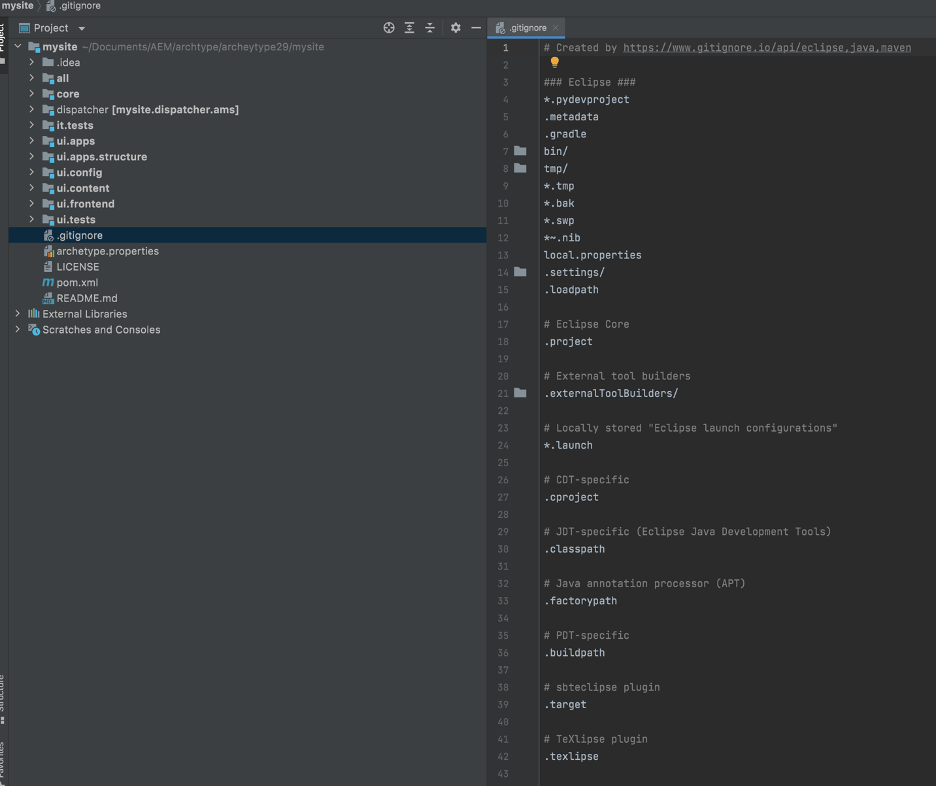
Please make sure we add the following gitignore to ignore some of the IDE related files

### Java ###
*.class

# Mobile Tools for Java (J2ME)
.mtj.tmp/

# Package Files #
*.jar
*.war
*.ear

# virtual machine crash logs, see http://www.java.com/en/download/help/error_hotspot.xml
hs_err_pid*


### Intellij ###
# Covers JetBrains IDEs: IntelliJ, RubyMine, PhpStorm, AppCode, PyCharm

*.iml
.repo

## Directory-based project format:
.idea/
.svn/

# if you remove the above rule, at least ignore the following:

# User-specific stuff:
# .idea/workspace.xml
# .idea/tasks.xml
# .idea/dictionaries

# Sensitive or high-churn files:
# .idea/dataSources.ids
# .idea/dataSources.xml
# .idea/sqlDataSources.xml
# .idea/dynamic.xml
# .idea/uiDesigner.xml

# Gradle:
# .idea/gradle.xml
# .idea/libraries

# Mongo Explorer plugin:
# .idea/mongoSettings.xml

## File-based project format:
*.ipr
*.iws

## Plugin-specific files:

# IntelliJ
/out/

# mpeltonen/sbt-idea plugin
.idea_modules/

# JIRA plugin
atlassian-ide-plugin.xml

# Crashlytics plugin (for Android Studio and IntelliJ)
com_crashlytics_export_strings.xml
crashlytics.properties
crashlytics-build.properties


### SublimeText ###
# cache files for sublime text
*.tmlanguage.cache
*.tmPreferences.cache
*.stTheme.cache

# workspace files are user-specific
*.sublime-workspace

# project files should be checked into the repository, unless a significant
# proportion of contributors will probably not be using SublimeText
# *.sublime-project

# sftp configuration file
sftp-config.json


### Eclipse ###
*.pydevproject
.metadata
.gradle
bin/
tmp/
*.tmp
*.bak
*.swp
*~.nib
local.properties
.settings/
.loadpath

# Eclipse Core
.project

# External tool builders
.externalToolBuilders/

# Locally stored "Eclipse launch configurations"
*.launch

# CDT-specific
.cproject

# JDT-specific (Eclipse Java Development Tools)
.classpath

# PDT-specific
.buildpath

# sbteclipse plugin
.target

# TeXlipse plugin
.texlipse

# Brackets projects
.brackets.json

### Maven ###
pom.xml.tag
pom.xml.releaseBackup
pom.xml.versionsBackup
pom.xml.next
release.properties
dependency-reduced-pom.xml
buildNumber.properties

### Vagrant ###
.vagrant/

### SASS ###
.sass-cache/

### NPM ###
/view/prototype-dist/
**/node_modules/
node/

### .env ###
.env

### Progressive components ###
/**/*.gen.*

### Git ###
*.orig

### OSX ###
.DS_Store
vendor/css/*.css
*.gen.js
*.gen.html

### DO NOT IGNORE THIRD PARTY BUNDLE JARS ###


### Temp markdown files ###
.README.md.html

### AMS version helper

### acache httpd logs
apache/httpd/logs
apache/logs

Based on your requirements remove unwanted modules:

Dispatcher, tests modules (usually most of the projects having multiple people working on multiple sites usually keep dispatcher modules separate, and fast pace projects won’t get time to write unit test cases, which is highly recommended)

Update the POM.xml
Update the versions:
<modelVersion>4.0.0</modelVersion>
<groupId>com.mysite</groupId>
<artifactId>mysite</artifactId>
<packaging>pom</packaging>
<version>1.0.0-SNAPSHOT</version>
<name>My Site</name>
<description>My Site</description>
Update the core component version to the latest :

Core component’s latest version

<properties>
        <aem.host>localhost</aem.host>
        <aem.port>4502</aem.port>
        <aem.publish.host>localhost</aem.publish.host>
        <aem.publish.port>4503</aem.publish.port>
        <sling.user>admin</sling.user>
        <sling.password>admin</sling.password>
        <vault.user>admin</vault.user>
        <vault.password>admin</vault.password>
        <frontend-maven-plugin.version>1.12.0</frontend-maven-plugin.version>
        <core.wcm.components.version>2.17.0</core.wcm.components.version>
        <bnd.version>5.1.2</bnd.version>
        <project.build.sourceEncoding>UTF-8</project.build.sourceEncoding>
        <project.reporting.outputEncoding>UTF-8</project.reporting.outputEncoding>
        <componentGroupName>My Site</componentGroupName>
    </properties>
Maven compiler to 11 if you are using JDK 11:
<plugin>
   <groupId>org.apache.maven.plugins</groupId>
   <artifactId>maven-compiler-plugin</artifactId>
   <configuration>
      <source>1.8</source>
      <target>1.8</target>
   </configuration>
</plugin>

If we don’t update you won’t be able to use JDK 11 features To make sure you are using JDK 11

<release>11</release>

Add Jetbrains dependency for adding @null or @Nullable annotations:

<meta charset="utf-8"><dependency>
   <groupId>org.jetbrains</groupId>
   <artifactId>annotations</artifactId>
   <version>17.0.0</version>
</dependency>