Get a List of all the Assets which are missing references
Requirement:
Get the list of broken asset references to unpublish and remove them repo to improve the system stability and performance.
Introduction:
How do assets get published?
The author uploads the images and publishes the assets
Create a launcher and workflow which process assets metadata and publish the pages
Whenever we publish any pages and if the page has references to assets, then during publishing, it asks to replicate the references as well.
What happens when the page is unpublished?
When the page is deactivated, assets referenced to the page will not be deactivated because this asset might have reference to the other pages hence out of the box assets won’t be deactivated.
If we perform cleanup, deactivate and delete old pages, we might not be cleaning up assets related to this page.
Advantages of cleaning up old assets?
Drastically reduces repository size
Improves DAM Asset search
Improves indexing
Get Publish Report using Assets Report:
Go to Tools -> Assets -> Reports as shown below:
Asset Reports
Click on create and click on Publish report
Select Publish report
Provide folder path and start date and end date
Add Report details
Select the columns as per requirement
Configure columns for the report
Finally, report will be ready with all the assets lists as shown below
Completed Reports
Download the report to see the final list of images
Example Report CSV file
If Images are unpublished then we can ask authors to review and delete them
If images are published but has no references to figure this out, we need a new process.
MCP (Manage Controlled Processes) is both a dashboard for performing complex tasks and a rich API for defining these tasks as process definitions. In addition to kicking off new processes, users can also monitor running tasks, retrieve information about completed tasks, halt work, and so on.
Add the following maven dependency to your pom to extend MCP
After building the code you can see the new Process showing up in MCP
Borken Asset Refernce Process
Copy the Path column into the new Excel sheet as shown below
Path column into new excel file
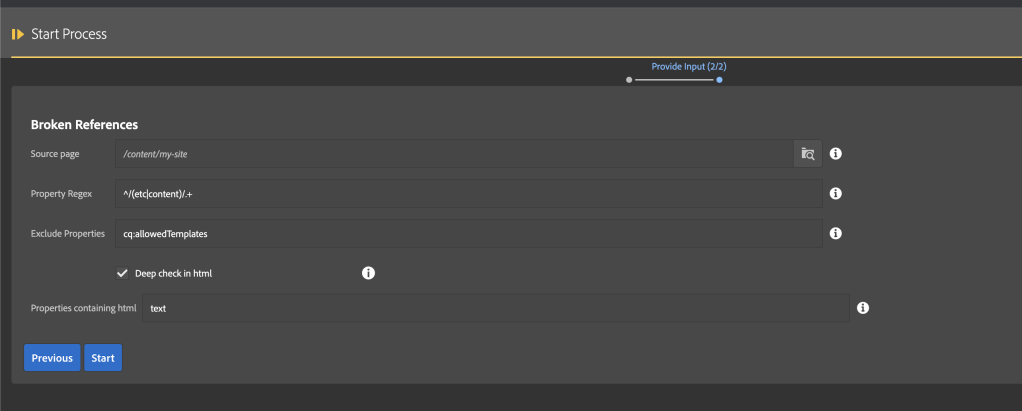
Upload into the process and start to see all the images which are published yet unreferenced as shown below
Why does Chunk count?
Chunk count helps the SQL 2 query to group by the paths, which will be maxing 4500 and it won’t take more than that (configurable based on the environment). However basically, if we have 20000 / 4500 = 4.44 ~ 5 we will be running the query max five times to generate the below report
Share the report with the content authors team to validate if images are required if not plan to clean up using
After completing the processExample report and we can download and share with Authors
Clean up Process:
Authors don’t have to unpublish and delete individual images, then can you use the below process to upload the excel sheet with all the approved image paths and upload it to the process to deactivate and delete
Unclosed resource resolver issue is causing performance impact on the AEM environment
It’s hard to debug and fix the resolver issues
Best practices to close the resolver
Requirement:
Provide all the best practices to close the unclosed resource resolve and in turn improve environment stability.
Introduction:
Usually, we create/open a resource resolver:
Servlets
OSGi Services
Workflows
Schedulers
Purpose of service user based resolver.
To get access to the paths which is blocked for every one group, make changes and commit changes etc.
Creating Resource resolver instance:
This feature was released with Java 7 and the try-with-resources statement is a try statement that declares one or more resources. A resource is an object that must be closed after the program is finished with it. The try-with-resources statement ensures that each resource is closed at the end of the statement. Any object that implements java.lang.AutoCloseable, which includes all objects which implement java.io.Closeable, can be used as a resource.
So basically, creating the resolver within the calling class like below will auto close:
AEM environment size is increasing because of user-generated packages
Requirement:
Can we purge all the user-generated packages to improve stability?
Introduction:
A package is a zip file holding repository content in the form of a file-system serialization (called “vault” serialization). This provides an easy-to-use-and-edit representation of files and folders.
Packages include content, both page content and project-related content, selected using filters.
A package also contains vault meta information, including the filter definitions and import configuration information. Additional content properties (that are not used for package extraction) can be included in the package, such as a description, a visual image, or an icon; these properties are for the content package consumer and for informational purposes only.
Usually, Developers or AEM content synch or even code deployment will keep on piling up in the CRX packages and it will be consuming spaces on MBs and even sometimes GBs.
If we move more packages, then loading crx/packmgr would more time.
Hence you can create a scheduler that runs on off-hours which cleans up the packages and which will get back the space and avoids extra maintenance tasks.
The below scheduler will remove all the packages for my_package group we can add business logic to handle for other groups
package com.mysite.core.schedulers;
import org.osgi.service.metatype.annotations.AttributeDefinition;
import org.osgi.service.metatype.annotations.AttributeType;
import org.osgi.service.metatype.annotations.ObjectClassDefinition;
@ObjectClassDefinition(name = "Old Packages Purge Schedular", description = "Remove old packages from different paths")
public @interface PurgeOldPackagesSchedulerConfig {
    String DEFAULT_SCHEDULER_EXPRESSION = "0 0 16 ? * SUN *"; // every Sunday 4 PM
    boolean DEFAULT_SCHEDULER_CONCURRENT = false;
    @AttributeDefinition(name = "Enabled", description = "True, if scheduler service is enabled", type = AttributeType.BOOLEAN)
    boolean enabled() default true;
    @AttributeDefinition(name = "Cron expression defining when this Scheduled Service will run", description = "[every minute = 0 * * * * ?], [12:00am daily = 0 0 0 ? * *]", type = AttributeType.STRING)
    String schedulerExpression() default DEFAULT_SCHEDULER_EXPRESSION;
    @AttributeDefinition(name = "package paths", description = "package folder paths", type = AttributeType.STRING)
    String[] packagesPaths() default {"my_packages"};
}
How to cache my query results? How to Update my queries?
Requirement:
Provide details on how to add the persist graphql query, cache the results from graphql and update the persisted query
Provide curl commands to execute in terminal or on postman
Introduction:
Persisted Queries (Caching)
After preparing a query with a POST request, it can be executed with a GET request that can be cached by HTTP caches or a CDN.
This is required as POST queries are usually not cached, and if using GET with the query as a parameter there is a significant risk of the parameter becoming too large for HTTP services and intermediates.
Persisted queries must always use the endpoint related to the appropriate Sites configuration; so, they can use either, or both:
Specific Sites configuration and endpoint
Creating a persisted query for a specific Sites configuration requires a corresponding Sites-configuration-specific endpoint (to provide access to the related Content Fragment Models).
For example, to create a persisted query specifically for the SampleGraphQL Sites configuration:
a corresponding SampleGraphQL-specific Sites configuration
Go to the tools section for the aem and general section and select Configuration Browser as shown below
Configuration browser
Add select the conf folder and go to the properties and make GraphQL Persistent Queries checkbox is checked
Enable persistent queries
a SampleGraphQL-specific endpoint must be created in advance.
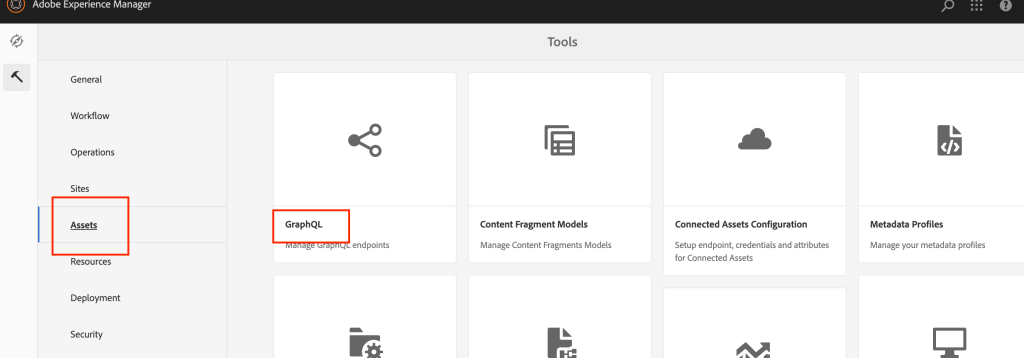
Go to tools section for the aem and assets section and select GraphQL as shown below
assets -> graphql
Add the new end point as shown below:
endpoint
Add the following CORS configurations for the GraphQL API calls:
CORS config
Register graphql search path:
Register Servlet path
Here are the steps required to persist a given query:
Prepare the query by putting it to the new endpoint URL /graphql/persist.json/<config>/<persisted-label>.
For example, create a persisted query:
curl -u admin:admin -X PUT 'http://localhost:4502/graphql/persist.json/SampleGraphQL/cities' \
--header 'Content-Type: application/json' \
--data-raw '{
  cityList {
    items {
      _path
      name
      country
      population
    }
  }
}'
How to Bulk Add, Update or remove page properties in AEM? Without using the Groovy console.
Requirement:
Create a reusable process that can be used to search for the pages based on resourceType and do the CRUD operations on the results.
Introduction:
Usually, whenever we are using editable templates, we might have some initial content but for some reason, if we want to update the experience fragment path or some page properties then usually, we go for Groovy script to run bulk update.
But AMS don’t install developer tools on the PROD, we need to go to other options and for the above requirement, we can use MCP.
MCP (Manage Controlled Processes) is both a dashboard for performing complex tasks and a rich API for defining these tasks as process definitions. In addition to kicking off new processes, users can also monitor running tasks, retrieve information about completed tasks, halt work, and so on.
Add the following maven dependency to your pom to extend MCP
Create Process Definition factory – PropertyUpdateFactory
This class tells ACS Commons MCP to pick the process definition and process name getName and you need to mention the implementation class inside the createProcessDefinitionInstance method as shown below:
package com.mysite.mcp.process;

import org.osgi.service.component.annotations.Component;
import com.adobe.acs.commons.mcp.ProcessDefinitionFactory;

@Component(service = ProcessDefinitionFactory.class, immediate = true)
public class PropertyUpdateFactory extends ProcessDefinitionFactory<PropertyUpdater> {
    @Override
    public String getName() {
        return "Property Updator";
    }
    @Override
    protected PropertyUpdater createProcessDefinitionInstance() {
        return new PropertyUpdater();
    }
}
Create Process Definition implementation – PropertyUpdater
This is an implementation class where we are defining all the form fields required for the process to run
But in GraphQL you can send the parameters like a query and get all the related content as well
GraphQL API flow
To use Graph QL you need to prepare schemas and based on the schema you can do filter the data.
For more information on GraphQL, you can be visiting the link
Benefits:
Avoiding iterative API requests as with REST,
Ensuring that delivery is limited to the specific requirements,
Allowing for bulk delivery of exactly what is needed for rendering as the response to a single API query.
How GraphQL can be used with Content Fragments?
GraphQL is a strongly typed API, which means that data must be clearly structured and organized by type.
The GraphQL specification provides a series of guidelines on how to create a robust API for interrogating data on a certain instance. To do this, a client needs to fetch the Schema, which contains all the types necessary for a query.
For Content Fragments, the GraphQL schemas (structure and types) are based on Enabled Content Fragment Models and their data types.
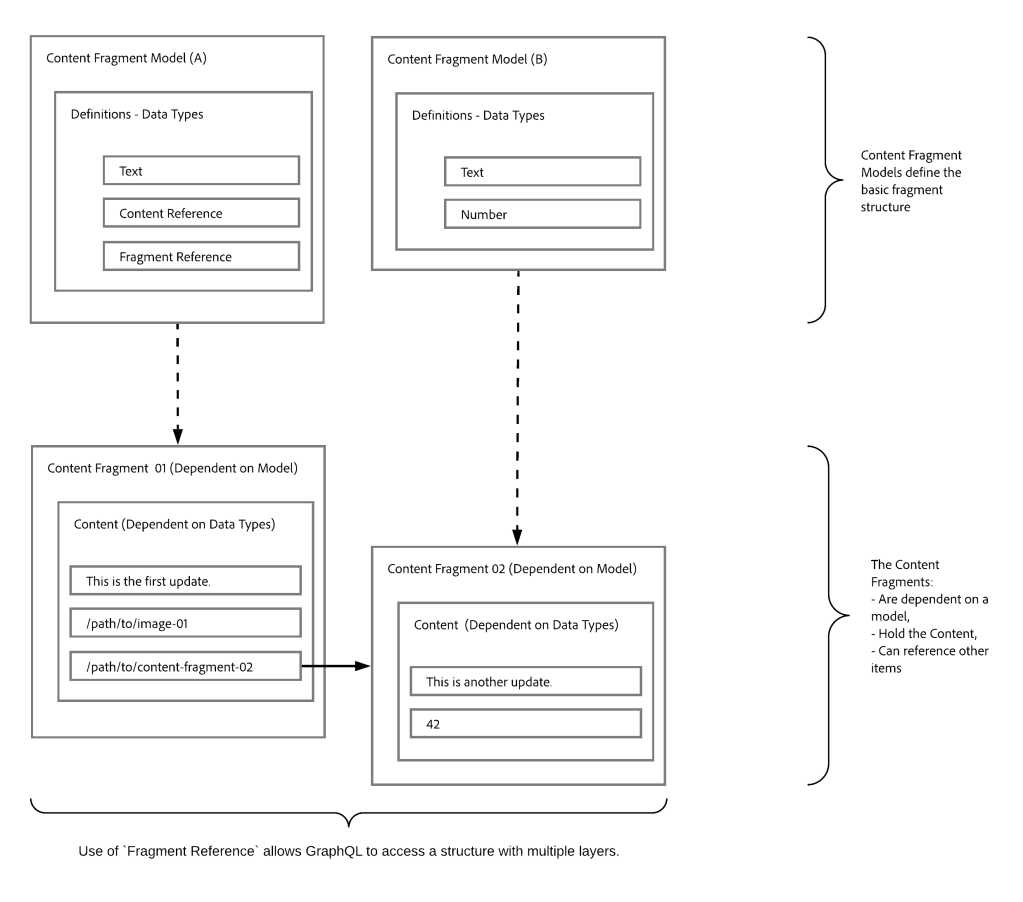
How Graph QL works on related content fragments?
Content Fragments can be used as a basis for GraphQL for AEM queries as:
They enable you to design, create, curate and publish page-independent content.
The Content Fragment Models provide the required structure by means of defined data types.
The Fragment Reference, available when defining a model, can be used to define additional layers of structure.
Model References provided by Adobe
Content Fragments
Contain structured content.
They are based on a Content Fragment Model, which predefines the structure for the resulting fragment.
Content Fragment Models
Are used to generate the Schemas, once Enabled.
Provide the data types and fields required for GraphQL. They ensure that your application only requests what is possible, and receives what is expected.
The data type Fragment References can be used in your model to reference another Content Fragment, and so introduce additional levels of structure.
Fragment References
Is of particular interest in conjunction with GraphQL.
Is a specific data type that can be used when defining a Content Fragment Model.
References another fragment, dependent on a specific Content Fragment Model.
Allows you to retrieve structured data.
When defined as a multifeed, multiple sub-fragments can be referenced (retrieved) by the prime fragment.
JSON Preview
To help with designing and developing your Content Fragment Models, you can preview JSON output.
Install:
AEM 6.5.11 (aem-service-pkg-6.5.11.zip)
Graph QL OAK Index (cfm-graphql-index-def-1.0.0.zip)
GraphiQL Developer tool (graphiql-0.0.6.zip)
For AEMacS you will get the content fragment with the latest update.
Go to configuration folder
AEM tools section
General selection in sidebar
Configuration bowser
As shown below:
Configuration Folder
Create a configuration folder and select
Content Fragment Models
GraphQL Persistent Queries
As shown below:
Create a Conf folder with required checkboxes
Go to Assets Model:
AEM tools section
Assets selection in sidebar
Content Fragments Model
As shown below:
Go to Assets CF
Select the folder and create the content fragments as shown below:
CF models
You can also install the package attached here
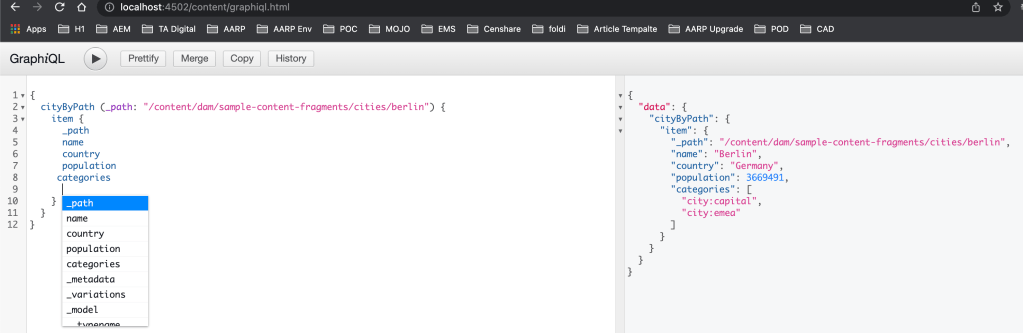
Go to the following URL to access the GraphiQL developer tool and run the following query:
Note: you can also get all the autosuggestions by using the ctrl+space shortcut
{
  cityByPath(_path: "/content/dam/sample-content-fragments/cities/berlin") {
    item {
      _path
      name
      country
      population
      categories
    }
  }
}
How to use java streams in AEM? Can I use streams for iterating and resources?
Requirement:
Use Java streams to iterate child nodes, validating and resources and API’s.
Introduction:
There are a lot of benefits to using streams in Java, such as the ability to write functions at a more abstract level which can reduce code bugs, compact functions into fewer and more readable lines of code, and the ease they offer for parallelization
Streams have a strong affinity with functions
Streams encourage less mutability
Streams encourage looser coupling
Streams can succinctly express quite sophisticated behavior
Streams provide scope for future efficiency gains
Java Objects:
This class consists of static utility methods for operating on objects. These utilities include null-safe or null-tolerant methods for computing the hash code of an object, returning a string for an object, and comparing two objects.
if (Objects.nonNull(resource)) {
  resource.getValueMap().get("myproperty", StringUtils.EMPTY);
}
Java Optional:
Trying using Java Optional util, which is a box type that holds a reference to another object.
Is immutable and non serializable ant there is no public constructor and can only be present or absent
It is created by the of(), ofNullable(), empty() static method.
In the below example Optional resource is created and you can check whether the resource is present and if present then get the valuemap
Optional < Resource > res = Optional.ofNullable(resource);
if (res.isPresent()) {
    res.get().getValueMap().get("myproperty", StringUtils.EMPTY);
}
you can also call stream to get children’s as shown below:
Optional < Resource > res = Optional.ofNullable(resource);
if (res.isPresent()) {
    List < Resource > jam = res.stream().filter(Objects::nonNull).collect(Collectors.toList());
}
Java Stream Support:
Low-level utility methods for creating and manipulating streams. This class is mostly for library writers presenting stream views of data structures; most static stream methods intended for end users are in the various Stream classes.
In the below example we are trying to get a resource iterator to get all the child resources and map the resources to a page and filter using Objects and finally collect the list of pages.
We can also adapt the resource to Page API and call the listchilderens to get all the children and using stream support we are going to map the page paths into a list as shown below:
No, we can also use Content Fragment and other API’s as well for example in the below code we are trying to iterate contentfragment and get all the variations of the contentfragment.
We have the following content fragment as part of the AEM
Car details
Agent details
And each car can have multiple agents or agents will be selling multiple cars. How can we link between Cars and Agents CF? and how can we get the linked content onto the page?
Requirement:
Link the Car and Agent CF to maintain the relationship between the content fragments and the same can be pulled into the page and exported.
Introduction:
Content Fragments (CF) allow us to manage page-independent content. They help us prepare content for use in multiple locations/over multiple channels. These are text-based editorial content that may include some structured data elements that are considered pure content without design or layout information. Content Fragments are intended to be used and reused across channels.
Usage
Highly structured data-entry/form-based content
Long-form editorial content (multi-line elements)
Content managed outside the life cycle of the channels delivering it
Create the Car and Agents content fragment models as shown below:
Agent Content fragmentCar Content Fragment
Create a custom component called has linkedcontentfragment as shown below:
Based on the element name condition call the LinkedContentFragment Sling model and also pass the elements to be rendered (based on element names, element data will be pulled).
Create Sling model interface LinkedContentFragment as shown below:
package com.mysite.core.models;

import com.adobe.cq.wcm.core.components.models.Component;
import com.adobe.cq.wcm.core.components.models.contentfragment.ContentFragment;
import java.util.List;

/**
 * Defines the {@code Agent CF Model} Sling Model for the {@code /apps/mysite/components/linkedcontentfragment} component.
 */
public interface LinkedContentFragment extends Component {
    /**
     * Returns the Agents List
     *
     * @return the Content Fragment
     */
    default List<ContentFragment> getAgentsList() {
        throw new UnsupportedOperationException();
    }
}
Create model implementation class called LinkedContentFragmentImpl as shown below, get the element data (String array of paths) and elements to be pulled create a synthetic resource and adapt to core component Content fragment model to pull the element details as well as datalayer (tracking purposes)
How can I get support for Core Image component within content fragment component?
Why should we use Core Image component?
Requirement:
Get support for OOTB image component within content fragment component
Introduction:
The Image Component features adaptive image selection and responsive behaviour with lazy loading for the page visitor as well as easy image placement.
The Image Component comes with robust responsive features ready right out of the box. At the page template level, the design dialog can be used to define the default widths of the image asset. The Image Component will then automatically load the correct width to display depending on the browser window’s size. As the window is resized, the Image Component dynamically loads the correct image size on the fly. There is no need for component developers to worry about defining custom media queries since the Image Component is already optimized to load your content.
In addition, the Image Component supports lazy loading to defer loading of the actual image asset until it is visible in the browser, increasing the responsiveness of your pages.
Create Custom Image content fragment component as shown below and add the following conditions into the element.html file:
Image Contentfragment Component
In the above HTL we are trying to tell if the element name contains the “image” (eg: primaryimage) keyword then don’t print it instead of that call an image model and get synthetic image resource
Note: Make sure your content fragment element name (field name) contains image word
Create a Sling mode ImageContentFragment Interface as shown below:
Create a Sling mode implementation ImageContentFragmentImpl class as shown below, this class is used to create a synthetic image resource for Adaptive Image Servlet to work:
Create an ImageDelegate Lombok based delegation class as shown below, for this example, I am using Image V3 component and this class is used to modify the image srcset method to add image path into the image URL:
Create a new Adaptive Image servlet and EnhancedRendition class, this servlet is used for displaying appropriate rendition of image component based on width selected based on browser width and pixel ratio:
Adaptive Image servlet is a modified version of the Core component Adaptive Image servlet because we are using synthetic image component and Enhanced Rendition class is a support class to get the best image rendition.
Create a simple content fragment Model as shown below:
Make sure the contentreference field name contains the image
Sample Content Fragment Model
Create a new content fragment under asset path (/content/dam/{project path}) as shown below:
Content Fragment
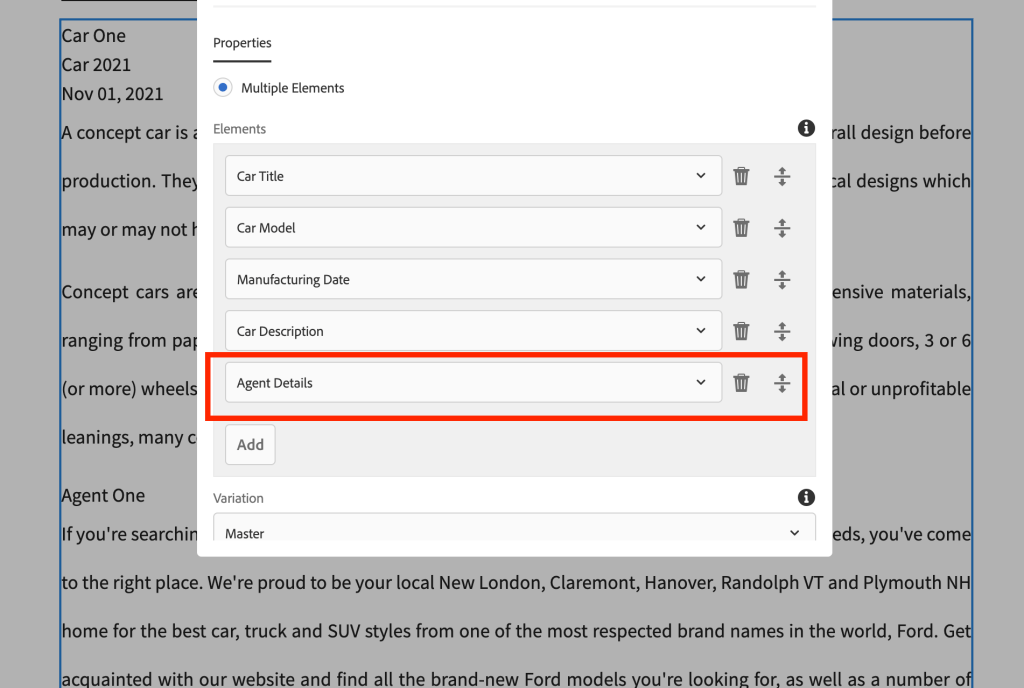
Create a sample page and add the content fragment component and select all the fields as a multifield as shown below:
Custom Content Fragment Component Authoing
As we can see we are able to fetch Core component Image component with Image widths configured into Image component policy (design dialog)
Content Fragment with OOTB Image
You can also get the actual working code from the below link:














 AEM best practices and development guide