Comparing Stream-Based, Page.listChildren, and Query Builder Methods for Listing AEM Children Pages

Problem Statement:

What is the best way to list all the children in AEM?

Stream-based VS page.listChildren VS Query Builder

Introduction:

AEM Sling Query is a resource traversal tool recommended for content traversal in AEM. Traversal using listChildren(), getChildren(), or the Resource API is preferable to writing JCR Queries as querying can be more costly than traversal. Sling Query is not a replacement for JCR Queries. When traversal involves checking multiple levels down, Sling Query is recommended because it involves lazy evaluation of query results.

JCR queries in AEM development and recommends using them sparingly in production environments due to performance concerns. JCR queries are suitable for end-user searches and structured content retrieval but should not be used for rendering requests such as navigation or content counts.

How can I get all the child pages in AEM using JCR Query?

List<String> queryList = new ArrayList<>();
Map<String, String> map = new HashMap<>();
map.put("path", resource.getPath());
map.put("type", "cq:PageContent");
map.put("p.limit", "-1");

Session session = resolver.adaptTo(Session.class);
Query query = queryBuilder.createQuery(PredicateGroup.create(map), session);
SearchResult result = query.getResult();
ResourceResolver leakingResourceResolverReference = null;
try {
    for (final Hit hit : result.getHits()) {
        if (leakingResourceResolverReference == null) {
            leakingResourceResolverReference = hit.getResource().getResourceResolver();
        }
        queryList.add(hit.getPath());
    }
} catch (RepositoryException e) {
    log.error("Error collecting inherited section search results", e);
} finally {
    if (leakingResourceResolverReference != null) {
        leakingResourceResolverReference.close();
    }
}

But JCR Query consumes more resources

AEM recommends using Page.listchildren because of less complexity

List<String> pageList = new ArrayList<>();
Page page = resource.adaptTo(Page.class);
Iterator<Page> childIterator = page.listChildren(new PageFilter(), true);
StreamSupport.stream(((Iterable<Page>) () -> childIterator).spliterator(), false).forEach( r -> {
    pageList.add(r.getPath());
    }
);

But it sometimes misses some results in the result set and it’s slower compared to Java streams based

How about Java streams?

Java streams can iterate faster and execute faster and consumes very few resources

List<String> streamList = new ArrayList<>();
for (Resource descendant : (Iterable<? extends Resource>) traverse(resource)::iterator) {
    streamList.add(descendant.getPath());
}
private Stream<Resource> traverse(@NotNull Resource resourceRoot) {
    Stream<Resource> children = StreamSupport.stream(resourceRoot.getChildren().spliterator(), false)
            .filter(this::shouldFollow);
    return Stream.concat(
            shouldInclude(resourceRoot) ? Stream.of(resourceRoot) : Stream.empty(),
            children.flatMap(this::traverse)
    );
}

protected boolean shouldFollow(@NotNull Resource resource) {
    return !JcrConstants.JCR_CONTENT.equals(resource.getName());
}

protected boolean shouldInclude(@NotNull Resource resource) {
    return resource.getChild(JcrConstants.JCR_CONTENT) != null;
}

I recently came across this logic while debugging the OOTB sling sitemap generator: https://github.com/apache/sling-org-apache-sling-sitemap

results comparison

Stream-based results took just 3miliseconds compared to page.listChildren or query

Delete Unreferenced Assets AEM

Problem Statement:

Delete all the assets which don’t have references to improve AEM performance in turn Indexes and search/query performance.

Introduction:

How do assets get published?

  1. The author uploads the images and publishes the assets
  2. Create a launcher and workflow which processes assets metadata and publishes the pages
  3. Whenever we publish any pages and if the page has references to assets, then during publishing, it asks to replicate the references as well.

What happens when the page is unpublished?

  1. When the page is deactivated, assets referenced to the page will not be deactivated because this asset might have reference to the other pages hence out of the box assets won’t be deactivated.
  2. If we perform cleanup, deactivate and delete old pages, we might not be cleaning up assets related to this page.

What advantages of cleaning up of old assets?

  1. Drastically reduces repository size
  2. Improves DAM Asset search
  3. Improves indexing

Generate Published Asset Report by visiting:

Go to Tools -> Assets -> Reports as shown below:

Asset Report Tool Section

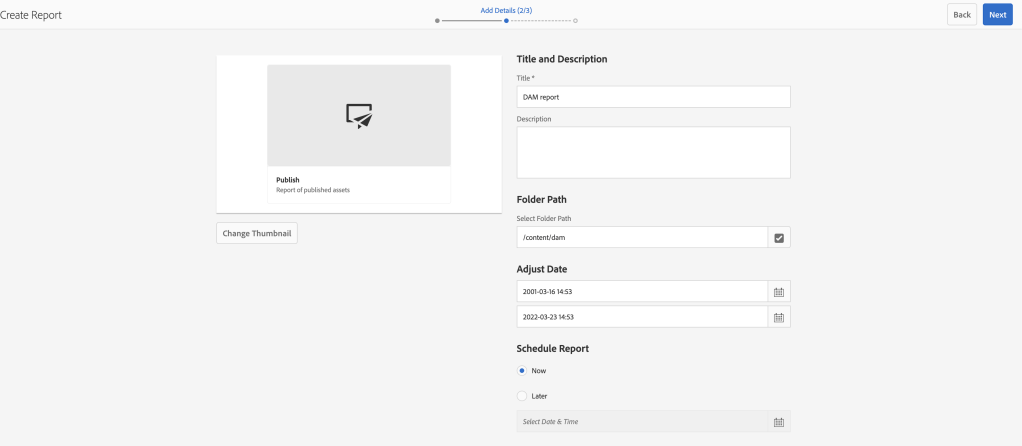
Click on create and click on Publish report

Asset Publish Report

Provide folder path and start date and end date

Asset Report Configure Page

Select the columns as per the requirement

Asset Report Custom Column Page

Finally, the report will be ready with all the assets lists as shown below

Asset Report

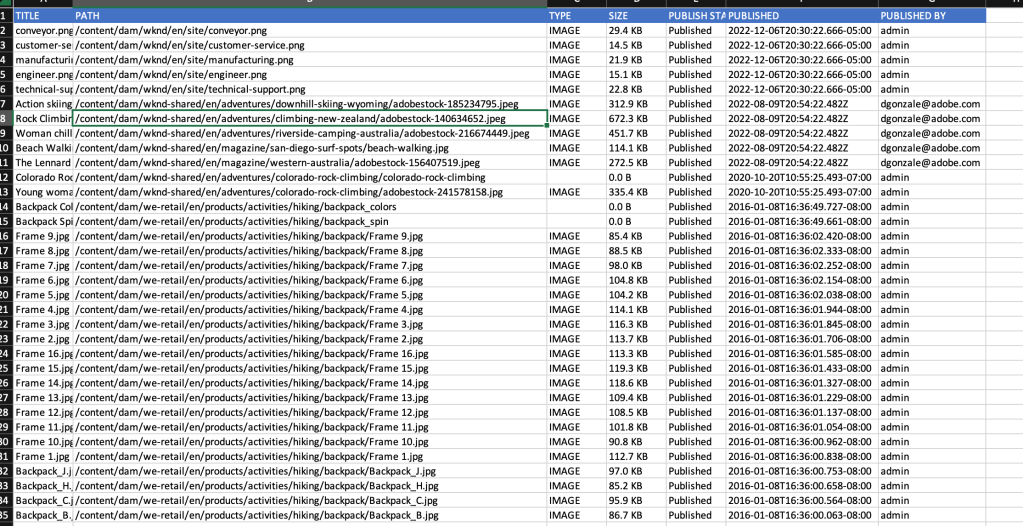
Download the report to see the final list of images

DAM Report result

To generate the report let’s create a new AEM tool:

AEM OOTB comes with multiple tools in AEM and to access all the tools you need to navigate to the tool section and select the appropriate sections to perform all the operations

For example:
  1. AEM operations
  2. Managing templates
  3. Cloud configurations
  4. ACS Commons tools etc..

Tools are an essential part of AEM and avoid any dependency on Groovy scripts or any add scripts and can be managed or extended at any given point in time.

Broken Asset Report generates a report of all the unreferenced assets by running a Reference Search query across the repository every 30s (by default), you can update the scheduler expression based on your repository size.

The scheduler also checks for the CPU/HEAP size before triggering the reference search process and for more details on Throttled scheduler please refer to the link.

In order to create a perfect content backup package please use the Tool generator to give your tool name and descriptions: https://kiransg.com/2022/11/24/aem-tool-create-generate-tool-from-scratch

Please refer to my GitHub repository for working code on Broken Asset Reference:

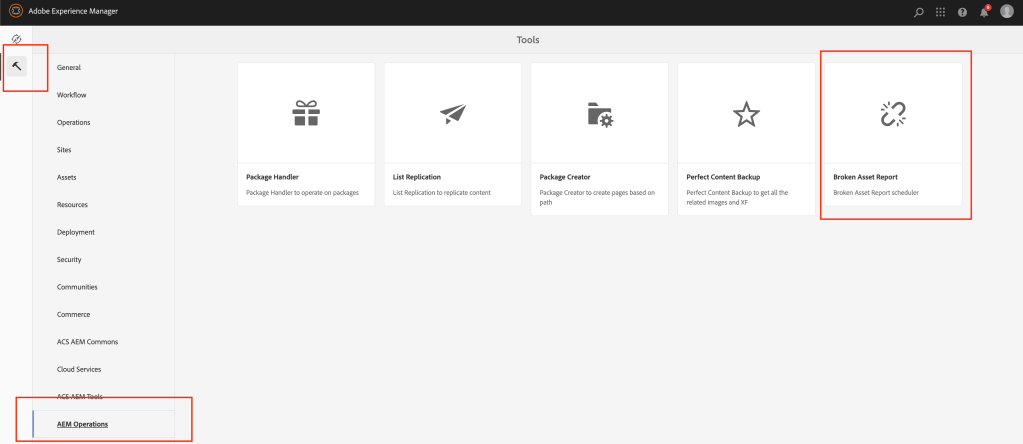
Once the repository is built and deployed, you will be able to access the Broken Asset Reference report as shown below:

Broken Asset Reference Tool Section

You can select the report just now created by you in the drop down as shown below:

Select the Asset Report from dropdown

Provide scheduler expression as per your needs and select the result refresh interval for every 10s or as per your needs

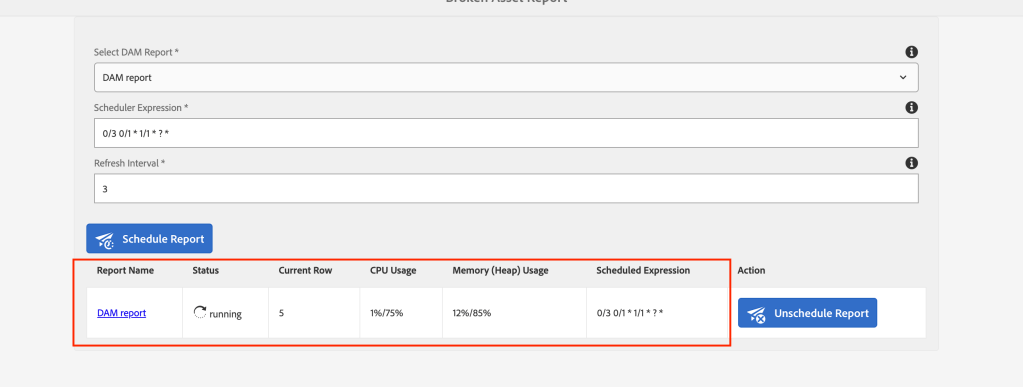
You can see the results as shown below once the process is kicked off and it will also show the current row its processing and also CPU/Heap usage.

Reference Search Running status

For some reason, if your system CPU/Heap is throttling then from the backend it takes care of not running your scheduler or you can also manually unschedule the scheduler.

Once your system’s CPU comes back to normal you can go back and select the report and schedule again and report generation picks from the current row where it was left off.

Once the processing is complete click on the report name to download the generated report.

Reference Search Completed Status
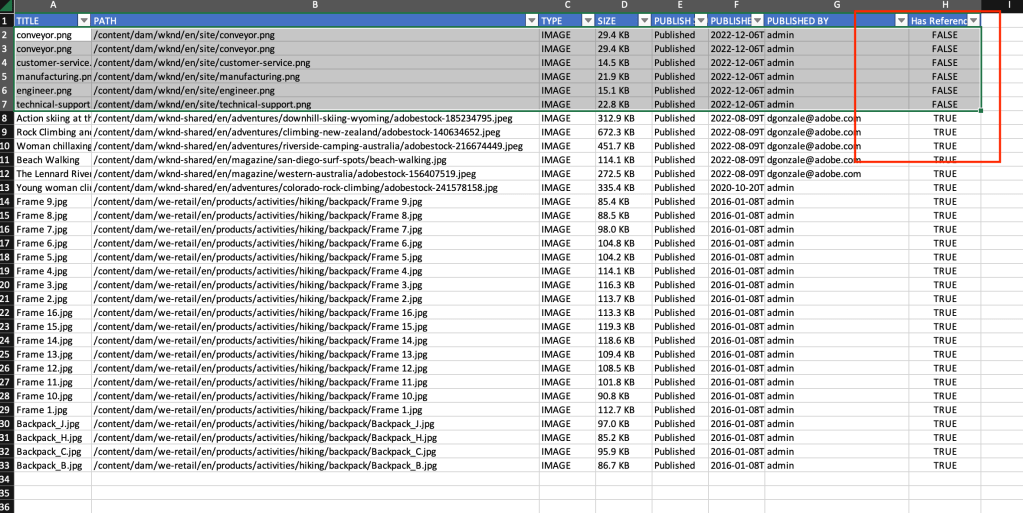
Report Excel with Has reference Column

Cross verification:

  1. You can rerun the generated report on the MCP broken asset reference.
  2. Generate the Splunk (logs) results by running a query to get all the assets to call (/content/dam) requests on dispatcher/publisher from the past 1year or so.
  3. You can also reach out to the Analytics team, requesting image impressions (data on image usage) from the past 1 year or so.

Please provide your valuable feedback in the comments.

AEM Query Builder Optimization using Java Streams and Resource Filter

Problem statement:

Can Java Streams and Resource Filter be used as an alternative to Query Builder queries in AEM for filtering pages and resources based on specific criteria?

Requirement:

The query for the pages whose resurcetype = “wknd/components/page” and get child resources which have an Image component (“wknd/components/image”) and get the file reference properties into a list

Query builder query would be like this:

@PostConstruct
private void initModel() {
  Map < String, String > map = new HashMap < > ();
  map.put("path", resource.getPath());
  map.put("property", "jcr:primaryType");
  map.put("property.value", "wknd/components/page");

  PredicateGroup predicateGroup = PredicateGroup.create(map);
  QueryBuilder queryBuilder = resourceResolver.adaptTo(QueryBuilder.class);

  Query query = queryBuilder.createQuery(predicateGroup, resourceResolver.adaptTo(Session.class));
  SearchResult result = query.getResult();

  List < String > imagePath = new ArrayList < > ();

  try {
    for (final Hit hit: result.getHits()) {
      Resource resultResource = hit.getResource();
      @NotNull
      Iterator < Resource > children = resultResource.listChildren();
      while (children.hasNext()) {
        final Resource child = children.next();
        if (StringUtils.equalsIgnoreCase(child.getResourceType(), "wknd/components/image")) {
          Image image = modelFactory.getModelFromWrappedRequest(request, child, Image.class);
          imagePath.add(image.getFileReference());
        }
      }
    }
  } catch (RepositoryException e) {
    LOGGER.error("error occurered while getting result resource {}", e.getMessage());
  }
}

Introduction

This article discusses the use of Java Streams and Resource Filter in optimizing AEM Query Builder queries. The article provides code examples for using Resource Filter Streams to filter pages and resources and using Java Streams to filter and map child resources based on specific criteria. The article also provides optimization strategies for AEM tree traversal to reduce memory consumption and improve performance.

Resource Filter bundle provides a number of services and utilities to identify and filter resources in a resource tree.

Resource Filter Stream:

ResourceFilterStream combines the ResourceStream functionality with the ResourcePredicates service to provide an ability to define a Stream<Resource> that follows specific child pages and looks for specific Resources as defined by the resources filter script. The ResourceStreamFilter is accessed by adaptation.

ResourceFilterStream rfs = resource.adaptTo(ResourceFilterStream.class);
rfs
  .setBranchSelector("[jcr:primaryType] == 'cq:Page'")
  .setChildSelector("[jcr:content/sling:resourceType] != 'apps/components/page/folder'")
  .stream()
  .collect(Collectors.toList());

Parameters

The ResourceFilter and ResourceFilteStream can have key-value pairs added so that the values may be used as part of the script resolution. Parameters are accessed by using the dollar sign ‘$’

rfs.setBranchSelector("[jcr:content/sling:resourceType] != $type").addParam("type","apps/components/page/folder");

Using Resource Filter Stream the example code would look like below:

@PostConstruct
private void initModel() {
  ResourceFilterStream rfs = resource.adaptTo(ResourceFilterStream.class);
  List < String > imagePaths = rfs.setBranchSelector("[jcr:primaryType] == 'cq:Page'")
    .setChildSelector("[jcr:content/sling:resourceType] == 'wknd/components/page'")
    .stream()
    .filter(r -> StringUtils.equalsIgnoreCase(r.getResourceType(), "wknd/components/image"))
    .map(r -> modelFactory.getModelFromWrappedRequest(request, r, Image.class).getFileReference())
    .collect(Collectors.toList());
}

Optimizing Traversals

Similar to indexing in a query there are strategies that you can do within a tree traversal so that traversals can be done in an efficient manner across a large number of resources. The following strategies will assist in traversal optimization.

Limit traversal paths

In a naive implementation of a tree traversal, the traversal occurs across all nodes in the tree regardless of the ability of the tree structure to support the nodes that are being looked for. An example of this is a tree of Page resources that has a child node of jcr:content which contains a subtree of data to define the page structure. If the jcr:content node is not capable of having a child resource of type Page and the goal of the traversal is to identify Page resources that match specific criteria then the traversal of the jcr:content node can not lead to additional matches. Using this knowledge of the resource structure, you can improve performance by adding a branch selector that prevents the traversal from proceeding down a nonproductive path

Limit memory consumption

The instantiation of a Resource object from the underlying ResourceResolver is a nontrivial consumption of memory. When the focus of a tree traversal is obtaining information from thousands of Resources, an effective method is to extract the information as part of the stream processing or utilize the forEach method of the ResourceStream object which allows the resource to be garbage collected in an efficient manner.

References:

https://sling.apache.org/documentation/bundles/resource-filter.html