
Optimize author experience and author performance in AEM

Problem statement:

How to improve the authoring experience in AEM using SDI?

Can I optimize page load time?

Can I cache all experience fragments on the pages in AEM?

Introduction:

The purpose of the module presented here is to replace dynamically generated components (eg. current time or foreign exchange rates) with server-side include tags (eg. SSI or ESI). Therefore, the dispatcher is able to cache the whole page but dynamic components are generated and included with every request. Components to include are chosen in filter configuration using resourceType attribute.

When the filter intercepts a request for a component with a given resourceType, it’ll return a server-side include tag (eg. <!–#include virtual=”/path/to/resource” –> for the Apache server). However, the path is extended by a new selector (XF by default). This is required because the filter has to know when to return actual content.

Before going through this article please visit my other blog on Cache Experience Fragments in AEM Using Sling Dynamic Include all the simple customization to cache call the experience fragments on the page to improve page load time on published pages.

Flow diagram on the approach:

As part of this implementation, we are trying to cache all the experience fragments at different paths like /mnt/var/www/author/content/experience-fragment/{site-structure} as shown below:

Flow diagram author SDI approach

If SDI is enabled on the author:

  • On the local author instance all the experience fragments might disappear if the author instance is accessed on the local dispatcher or any lower environments as shown below:
wknd header is missing
  • After accessing the page on the dispatcher attached to the author the experience fragment might be broken and it would allow the components on the experience fragment can be authored directly from the page (kind of new feature) but it would break if any permissions of authoring on header/footer etc.
wknd header is editable on the page

Override the wrapper component:

If it is a Layout container, then please override the responsivegrid.html by copying responsivegrid.html from wcm/foundation/components/responsivegrid the as shown below:

<sly data-sly-test="${wcmmode.edit}" data-sly-use.allowed="com.day.cq.wcm.foundation.model.AllowedComponents"></sly>
<div data-sly-use.api="com.day.cq.wcm.foundation.model.responsivegrid.ResponsiveGrid" class="${api.cssClass} ${allowed.cssClass}">
    <sly data-sly-test.isAllowedApplicable="${allowed.isApplicable}"
         data-sly-test="${isAllowedApplicable}"
         data-sly-use.allowedTemplate="/libs/wcm/foundation/components/parsys/allowedcomponents/allowedcomponents-tpl.html"
         data-sly-call="${allowedTemplate.allowedcomponents @ title=allowed.title, resourcesMap=allowed.resourcesMap,
            placeholderCss=allowed.placeholderCssClass,
            placeholderType=allowed.placeholderResourceType}"></sly>
    <sly data-sly-test="${!isAllowedApplicable}"
         data-sly-repeat.child="${api.paragraphs}"
         data-sly-resource="${child.resource @ decoration='true', cssClassName=child.cssClass, wcmmode='disabled'}"></sly>
    <sly data-sly-test="${!isAllowedApplicable && !wcmmode.disabled}"
         data-sly-resource="${resource.path @ resourceType='wcm/foundation/components/responsivegrid/new', appendPath='/*', decorationTagName='div', cssClassName='new section aem-Grid-newComponent'}"/>
</div>
responsivegrid override

If it is a Core Container component please override the responsivegrid.html and allowedcomponents.html by copying responsivegrid.html and allowedcomponents.html from core/wcm/components/container and the as shown below:

<template data-sly-template.responsiveGrid="${ @ container}">
    <div id="${container.id}"
         class="cmp-container"
         aria-label="${container.accessibilityLabel}"
         role="${container.roleAttribute}"
         style="${container.backgroundStyle @ context='styleString'}">
        <sly data-sly-resource="${resource @ resourceType='wcm/foundation/components/responsivegrid', wcmmode='disabled'}"></sly>
    </div>
</template>
<template data-sly-template.allowedcomponents="${@ title, components}">
    <div data-text="${title}"
         class="aem-AllowedComponent--title"></div>
    <sly data-sly-repeat.comp="${components}"
         data-sly-resource="${comp.path @ resourceType=comp.resourceType, decorationTagName='div', cssClassName=comp.cssClass, wcmmode='disabled'}"></sly>
</template>
Container responsivegrid override
Container allowedcomponent override

With the above fix, the experience fragment component won’t break and won’t be authorable on the page and works as expected.

wknd page working

What about the experience fragment page? It’s not authorable, because of the wcmmode=’disabled’ parameter in sightly

unable to edit component

To fix the above issue Create a sling model as shown below:

This model class replaces the wrapper component with Synthetic Resource pointing to the layout container or core container component, which will avoid SDI picking based on the resourcetype

package com.adobe.aem.guides.wknd.core.models;

import com.adobe.granite.ui.components.ds.ValueMapResource;
import org.apache.sling.api.SlingHttpServletRequest;
import org.apache.sling.api.resource.Resource;
import org.apache.sling.api.resource.ResourceResolver;
import org.apache.sling.api.resource.ValueMap;
import org.apache.sling.api.wrappers.ValueMapDecorator;
import org.apache.sling.models.annotations.DefaultInjectionStrategy;
import org.apache.sling.models.annotations.Model;
import org.apache.sling.models.annotations.injectorspecific.RequestAttribute;
import org.apache.sling.models.annotations.injectorspecific.SlingObject;
import javax.annotation.PostConstruct;
import java.util.ArrayList;
import java.util.HashMap;
import java.util.List;

@Model(adaptables = SlingHttpServletRequest.class, defaultInjectionStrategy = DefaultInjectionStrategy.OPTIONAL)
public class ExperienceFragmentModel {
    private static final String SDI_COMPONENT_RESOURCETYPE = "wknd/components/sdicontainer";
    private static final String RESPONSIVE_COMPONENT_RESOURCETYPE = "core/wcm/components/container/v1/container";

    @SlingObject
    private ResourceResolver resourceResolver;

    @RequestAttribute
    private List<Resource> structureResources;

    List<Resource> structuredResource = new ArrayList<>();

    @PostConstruct
    private void initModel() {
        if(!structureResources.isEmpty() && structureResources.size() == 1) {
            Resource rootRes = structureResources.get(0);
            if(null != rootRes && rootRes.hasChildren()) {
                Resource responsiveRes = rootRes.getChildren().iterator().next();
                if(responsiveRes.isResourceType(SDI_COMPONENT_RESOURCETYPE)) {
                    structuredResource.add(createSyntheticResource(responsiveRes));
                } else {
                    structuredResource = structureResources;
                }
            } else {
                structuredResource = structureResources;
            }
        } else {
            structuredResource = structureResources;
        }
    }

    public List<Resource> getStructuredResource() {
        return structuredResource;
    }

    private Resource createSyntheticResource(Resource childResource) {
        ValueMap properties = new ValueMapDecorator(new HashMap<>());
        Resource sdiComponentResource = new ValueMapResource(resourceResolver, childResource.getPath(), RESPONSIVE_COMPONENT_RESOURCETYPE, properties);
        return sdiComponentResource;
    }
}

Override body.html by copying the body.html from cq/experience-fragments/components/xfpage of the experience fragment page component and add the following code:

<sly data-sly-use.body="body.js" data-sly-use.templatedContainer="com.day.cq.wcm.foundation.TemplatedContainer"/>
<sly data-sly-test="${!templatedContainer.hasStructureSupport}"
     data-sly-resource="${body.resourcePath @ resourceType='wcm/foundation/components/parsys'}"/>
<div class="container">
    <sly data-sly-test="${templatedContainer.hasStructureSupport}"
         data-sly-use.rootChild="${'com.adobe.aem.guides.wknd.core.models.ExperienceFragmentModel' @structureResources=templatedContainer.structureResources }"
         data-sly-repeat.child="${rootChild.structuredResource}"
         data-sly-resource="${child.path @ resourceType=child.resourceType, decorationTagName='div'}"/>
</div>
<div data-sly-resource="${'cloudservices' @ resourceType='cq/cloudserviceconfigs/components/servicecomponents'}"
     data-sly-unwrap></div>
<sly data-sly-include="footerlibs.html"/>
override body.html

Finally, with the above fix, the experience fragment page is editable, and SDI include statement will disappear on the experience fragment page.
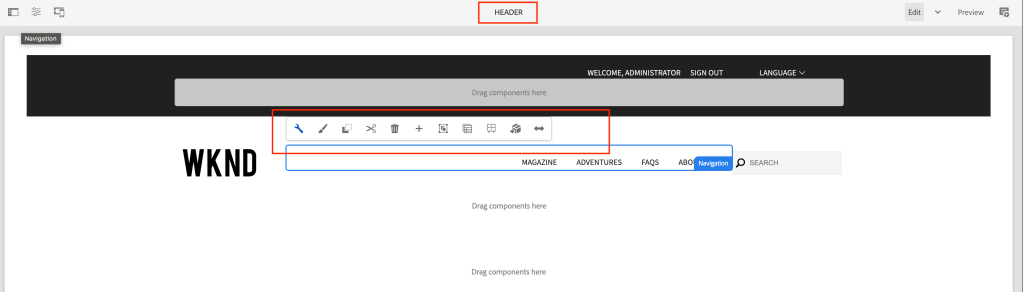
Finally component is editable

To clear the cache you need to add /author/content/{experience-fragment} path to acs commons dispatcher cache clear path

Advantages of caching Experience fragment at common or shared location:

  1. Increases initial page load – response time based on the number of XF on the page
  2. Improves overall page load time
  3. Better debugging SDI functionality – whenever the XF page is updated and published it removes from the cache and on a new page request a new cache is created and used on subsequent requests
  4. Decreases CPU utilization

AEM Query Builder Optimization using Java Streams and Resource Filter

Problem statement:

Can Java Streams and Resource Filter be used as an alternative to Query Builder queries in AEM for filtering pages and resources based on specific criteria?

Requirement:

The query for the pages whose resurcetype = “wknd/components/page” and get child resources which have an Image component (“wknd/components/image”) and get the file reference properties into a list

Query builder query would be like this:

@PostConstruct
private void initModel() {
  Map < String, String > map = new HashMap < > ();
  map.put("path", resource.getPath());
  map.put("property", "jcr:primaryType");
  map.put("property.value", "wknd/components/page");

  PredicateGroup predicateGroup = PredicateGroup.create(map);
  QueryBuilder queryBuilder = resourceResolver.adaptTo(QueryBuilder.class);

  Query query = queryBuilder.createQuery(predicateGroup, resourceResolver.adaptTo(Session.class));
  SearchResult result = query.getResult();

  List < String > imagePath = new ArrayList < > ();

  try {
    for (final Hit hit: result.getHits()) {
      Resource resultResource = hit.getResource();
      @NotNull
      Iterator < Resource > children = resultResource.listChildren();
      while (children.hasNext()) {
        final Resource child = children.next();
        if (StringUtils.equalsIgnoreCase(child.getResourceType(), "wknd/components/image")) {
          Image image = modelFactory.getModelFromWrappedRequest(request, child, Image.class);
          imagePath.add(image.getFileReference());
        }
      }
    }
  } catch (RepositoryException e) {
    LOGGER.error("error occurered while getting result resource {}", e.getMessage());
  }
}

Introduction

This article discusses the use of Java Streams and Resource Filter in optimizing AEM Query Builder queries. The article provides code examples for using Resource Filter Streams to filter pages and resources and using Java Streams to filter and map child resources based on specific criteria. The article also provides optimization strategies for AEM tree traversal to reduce memory consumption and improve performance.

Resource Filter bundle provides a number of services and utilities to identify and filter resources in a resource tree.

Resource Filter Stream:

ResourceFilterStream combines the ResourceStream functionality with the ResourcePredicates service to provide an ability to define a Stream<Resource> that follows specific child pages and looks for specific Resources as defined by the resources filter script. The ResourceStreamFilter is accessed by adaptation.

ResourceFilterStream rfs = resource.adaptTo(ResourceFilterStream.class);
rfs
  .setBranchSelector("[jcr:primaryType] == 'cq:Page'")
  .setChildSelector("[jcr:content/sling:resourceType] != 'apps/components/page/folder'")
  .stream()
  .collect(Collectors.toList());

Parameters

The ResourceFilter and ResourceFilteStream can have key-value pairs added so that the values may be used as part of the script resolution. Parameters are accessed by using the dollar sign ‘$’

rfs.setBranchSelector("[jcr:content/sling:resourceType] != $type").addParam("type","apps/components/page/folder");

Using Resource Filter Stream the example code would look like below:

@PostConstruct
private void initModel() {
  ResourceFilterStream rfs = resource.adaptTo(ResourceFilterStream.class);
  List < String > imagePaths = rfs.setBranchSelector("[jcr:primaryType] == 'cq:Page'")
    .setChildSelector("[jcr:content/sling:resourceType] == 'wknd/components/page'")
    .stream()
    .filter(r -> StringUtils.equalsIgnoreCase(r.getResourceType(), "wknd/components/image"))
    .map(r -> modelFactory.getModelFromWrappedRequest(request, r, Image.class).getFileReference())
    .collect(Collectors.toList());
}

Optimizing Traversals

Similar to indexing in a query there are strategies that you can do within a tree traversal so that traversals can be done in an efficient manner across a large number of resources. The following strategies will assist in traversal optimization.

Limit traversal paths

In a naive implementation of a tree traversal, the traversal occurs across all nodes in the tree regardless of the ability of the tree structure to support the nodes that are being looked for. An example of this is a tree of Page resources that has a child node of jcr:content which contains a subtree of data to define the page structure. If the jcr:content node is not capable of having a child resource of type Page and the goal of the traversal is to identify Page resources that match specific criteria then the traversal of the jcr:content node can not lead to additional matches. Using this knowledge of the resource structure, you can improve performance by adding a branch selector that prevents the traversal from proceeding down a nonproductive path

Limit memory consumption

The instantiation of a Resource object from the underlying ResourceResolver is a nontrivial consumption of memory. When the focus of a tree traversal is obtaining information from thousands of Resources, an effective method is to extract the information as part of the stream processing or utilize the forEach method of the ResourceStream object which allows the resource to be garbage collected in an efficient manner.

References:

https://sling.apache.org/documentation/bundles/resource-filter.html

Efficiently Iterating Child Nodes in Adobe Experience Manager (AEM)

Problem statement:

How can I iterate child nodes and get certain properties? Specifically, the requirement is to get child resources of the current resource and get all image component file reference properties into a list.

Requirement:

Get child resources of the current resource and get all image component file reference properties into a list

Can I use Java 8 Streams?

Introduction: Using while or for loop:

@PostConstruct
private void initModel() {
  List < String > imagePath = new ArrayList < > ();
  Iterator < Resource > children = resource.listChildren();
  while (children.hasNext()) {
    final Resource child = children.next();
    if (StringUtils.equalsIgnoreCase(child.getResourceType(), "wknd/components/image")) {
      Image image = modelFactory.getModelFromWrappedRequest(request, child, Image.class);
      imagePath.add(image.getFileReference());
    }
  }
}

Introduction Abstract Resource Visitor:

Sling provides AbstractResourceVisitor API, which performs traversal through a resource tree, which helps in getting child properties.

Create the class which extends AbstractResourceVisitor abstract class

Override accept, traverseChildren and visit methods as shown below

Call visit inside accepts method instead of super. visit, I have observed it was traversing twice if I use super hence keep this in mind

package utils;

import java.util.ArrayList;
import java.util.Iterator;
import java.util.List;
import org.apache.commons.lang3.StringUtils;
import org.apache.sling.api.resource.AbstractResourceVisitor;
import org.apache.sling.api.resource.Resource;
import org.apache.sling.api.resource.ResourceResolver;
import org.apache.sling.api.resource.ValueMap;
import com.day.cq.wcm.foundation.Image;
import com.drew.lang.annotations.NotNull;

public class ExampleResourceVisitor extends AbstractResourceVisitor {
	
	private static final String IMAGE_RESOURCE_TYPE = "wknd/components/image";
	private static final String TEXT_RESOURCE_TYPE = "wknd/components/text";
	
	private static final ArrayList<String> ACCEPTED_PRIMARY_TYPES = new ArrayList<>();
	static {
		ACCEPTED_PRIMARY_TYPES.add(IMAGE_RESOURCE_TYPE);
		ACCEPTED_PRIMARY_TYPES.add(TEXT_RESOURCE_TYPE);
	}
	
	private final List<String> imagepaths = new ArrayList<>();	
	
	public List<String> getImagepaths() {
		return imagepaths;
	}

	@Override
	public final void accept(final Resource resource) {
		if (null != resource) {
			final ValueMap properties = resource.adaptTo(ValueMap.class);
			final String primaryType = properties.get(ResourceResolver.PROPERTY_RESOURCE_TYPE, StringUtils.EMPTY);
			if(ACCEPTED_PRIMARY_TYPES.contains(primaryType)){
				visit(resource);
			}
			this.traverseChildren(resource.listChildren());
		}
	}

	@Override
	protected void traverseChildren(final @NotNull Iterator<Resource> children) {
		while (children.hasNext()) {
			final Resource child = children.next();
			accept(child);
		}
	}

	@Override
	protected void visit(@NotNull Resource resource) {
		final ValueMap properties = resource.adaptTo(ValueMap.class);
		final String primaryType = properties.get(ResourceResolver.PROPERTY_RESOURCE_TYPE, StringUtils.EMPTY);
		if (StringUtils.equalsIgnoreCase(primaryType, IMAGE_RESOURCE_TYPE)) {
			imagepaths.add(properties.get(Image.PN_REFERENCE, StringUtils.EMPTY));
		}
	}
}

Call the ExampleResourceVisitor and pass the resource and call the getImagepaths() to get the list of image paths

@PostConstruct
private void initModel() {
  ExampleResourceVisitor exampleResourceVisitor = new ExampleResourceVisitor();
  exampleResourceVisitor.accept(resource);
  List < String > imageVisitorPaths = exampleResourceVisitor.getImagepaths();
}

Introduction Resource Filter Stream:

Resource Filter bundle provides a number of services and utilities to identify and filter resources in a resource tree.

Resource Filter Stream:

ResourceFilterStream combines the ResourceStream functionality with the ResourcePredicates service to provide an ability to define a Stream<Resource> that follows specific child pages and looks for specific Resources as defined by the resources filter script. The ResourceStreamFilter is accessed by adaptation.

ResourceFilterStream rfs = resource.adaptTo(ResourceFilterStream.class);
rfs.stream().collect(Collectors.toList());

Example code for our problem statement would be like this:

@PostConstruct
private void initModel() {
  ResourceFilterStream rfs = resource.adaptTo(ResourceFilterStream.class);
  List < String > imagePaths = rfs.stream()
    .filter(r -> StringUtils.equalsIgnoreCase(r.getResourceType(), "wknd/components/image"))
    .map(r -> modelFactory.getModelFromWrappedRequest(request, r, Image.class).getFileReference())
    .collect(Collectors.toList());
}

Optimizing Traversals

Similar to indexing in a query there are strategies that you can do within a tree traversal so that traversals can be done in an efficient manner across a large number of resources. The following strategies will assist in traversal optimization.


Limit traversal paths

In a naive implementation of a tree traversal, the traversal occurs across all nodes in the tree regardless of the ability of the tree structure to support the nodes that are being looked for. An example of this is a tree of Page resources that has a child node of jcr:content which contains a subtree of data to define the page structure. If the jcr:content node is not capable of having a child resource of type Page and the goal of the traversal is to identify Page resources that match specific criteria then the traversal of the jcr:content node can not lead to additional matches. Using this knowledge of the resource structure, you can improve performance by adding a branch selector that prevents the traversal from proceeding down a nonproductive path


Limit memory consumption

The instantiation of a Resource object from the underlying ResourceResolver is a nontrivial consumption of memory. When the focus of a tree traversal is obtaining information from thousands of Resources, an effective method is to extract the information as part of the stream processing or utilize the forEach method of the ResourceStream object which allows the resource to be garbage collected in an efficient manner.