How to use java streams in AEM? Can I use streams for iterating and resources?
Requirement:
Use Java streams to iterate child nodes, validating and resources and API’s.
Introduction:
There are a lot of benefits to using streams in Java, such as the ability to write functions at a more abstract level which can reduce code bugs, compact functions into fewer and more readable lines of code, and the ease they offer for parallelization
Streams have a strong affinity with functions
Streams encourage less mutability
Streams encourage looser coupling
Streams can succinctly express quite sophisticated behavior
Streams provide scope for future efficiency gains
Java Objects:
This class consists of static utility methods for operating on objects. These utilities include null-safe or null-tolerant methods for computing the hash code of an object, returning a string for an object, and comparing two objects.
if (Objects.nonNull(resource)) {
  resource.getValueMap().get("myproperty", StringUtils.EMPTY);
}
Java Optional:
Trying using Java Optional util, which is a box type that holds a reference to another object.
Is immutable and non serializable ant there is no public constructor and can only be present or absent
It is created by the of(), ofNullable(), empty() static method.
In the below example Optional resource is created and you can check whether the resource is present and if present then get the valuemap
Optional < Resource > res = Optional.ofNullable(resource);
if (res.isPresent()) {
    res.get().getValueMap().get("myproperty", StringUtils.EMPTY);
}
you can also call stream to get children’s as shown below:
Optional < Resource > res = Optional.ofNullable(resource);
if (res.isPresent()) {
    List < Resource > jam = res.stream().filter(Objects::nonNull).collect(Collectors.toList());
}
Java Stream Support:
Low-level utility methods for creating and manipulating streams. This class is mostly for library writers presenting stream views of data structures; most static stream methods intended for end users are in the various Stream classes.
In the below example we are trying to get a resource iterator to get all the child resources and map the resources to a page and filter using Objects and finally collect the list of pages.
We can also adapt the resource to Page API and call the listchilderens to get all the children and using stream support we are going to map the page paths into a list as shown below:
No, we can also use Content Fragment and other API’s as well for example in the below code we are trying to iterate contentfragment and get all the variations of the contentfragment.
We have the following content fragment as part of the AEM
Car details
Agent details
And each car can have multiple agents or agents will be selling multiple cars. How can we link between Cars and Agents CF? and how can we get the linked content onto the page?
Requirement:
Link the Car and Agent CF to maintain the relationship between the content fragments and the same can be pulled into the page and exported.
Introduction:
Content Fragments (CF) allow us to manage page-independent content. They help us prepare content for use in multiple locations/over multiple channels. These are text-based editorial content that may include some structured data elements that are considered pure content without design or layout information. Content Fragments are intended to be used and reused across channels.
Usage
Highly structured data-entry/form-based content
Long-form editorial content (multi-line elements)
Content managed outside the life cycle of the channels delivering it
Create the Car and Agents content fragment models as shown below:
Agent Content fragmentCar Content Fragment
Create a custom component called has linkedcontentfragment as shown below:
Based on the element name condition call the LinkedContentFragment Sling model and also pass the elements to be rendered (based on element names, element data will be pulled).
Create Sling model interface LinkedContentFragment as shown below:
package com.mysite.core.models;

import com.adobe.cq.wcm.core.components.models.Component;
import com.adobe.cq.wcm.core.components.models.contentfragment.ContentFragment;
import java.util.List;

/**
 * Defines the {@code Agent CF Model} Sling Model for the {@code /apps/mysite/components/linkedcontentfragment} component.
 */
public interface LinkedContentFragment extends Component {
    /**
     * Returns the Agents List
     *
     * @return the Content Fragment
     */
    default List<ContentFragment> getAgentsList() {
        throw new UnsupportedOperationException();
    }
}
Create model implementation class called LinkedContentFragmentImpl as shown below, get the element data (String array of paths) and elements to be pulled create a synthetic resource and adapt to core component Content fragment model to pull the element details as well as datalayer (tracking purposes)
How can I get support for Core Image component within content fragment component?
Why should we use Core Image component?
Requirement:
Get support for OOTB image component within content fragment component
Introduction:
The Image Component features adaptive image selection and responsive behaviour with lazy loading for the page visitor as well as easy image placement.
The Image Component comes with robust responsive features ready right out of the box. At the page template level, the design dialog can be used to define the default widths of the image asset. The Image Component will then automatically load the correct width to display depending on the browser window’s size. As the window is resized, the Image Component dynamically loads the correct image size on the fly. There is no need for component developers to worry about defining custom media queries since the Image Component is already optimized to load your content.
In addition, the Image Component supports lazy loading to defer loading of the actual image asset until it is visible in the browser, increasing the responsiveness of your pages.
Create Custom Image content fragment component as shown below and add the following conditions into the element.html file:
Image Contentfragment Component
In the above HTL we are trying to tell if the element name contains the “image” (eg: primaryimage) keyword then don’t print it instead of that call an image model and get synthetic image resource
Note: Make sure your content fragment element name (field name) contains image word
Create a Sling mode ImageContentFragment Interface as shown below:
Create a Sling mode implementation ImageContentFragmentImpl class as shown below, this class is used to create a synthetic image resource for Adaptive Image Servlet to work:
Create an ImageDelegate Lombok based delegation class as shown below, for this example, I am using Image V3 component and this class is used to modify the image srcset method to add image path into the image URL:
Create a new Adaptive Image servlet and EnhancedRendition class, this servlet is used for displaying appropriate rendition of image component based on width selected based on browser width and pixel ratio:
Adaptive Image servlet is a modified version of the Core component Adaptive Image servlet because we are using synthetic image component and Enhanced Rendition class is a support class to get the best image rendition.
Create a simple content fragment Model as shown below:
Make sure the contentreference field name contains the image
Sample Content Fragment Model
Create a new content fragment under asset path (/content/dam/{project path}) as shown below:
Content Fragment
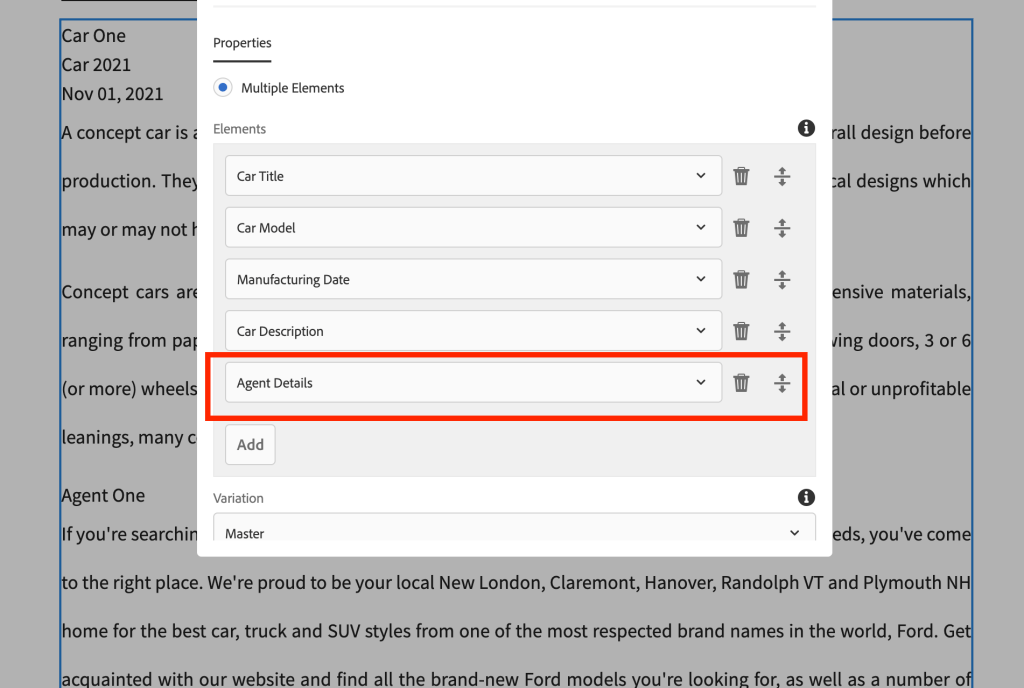
Create a sample page and add the content fragment component and select all the fields as a multifield as shown below:
Custom Content Fragment Component Authoing
As we can see we are able to fetch Core component Image component with Image widths configured into Image component policy (design dialog)
Content Fragment with OOTB Image
You can also get the actual working code from the below link:
How can I get support for the Core Accordion component within the content fragment component?
Why should we use the Core Accordion component?
Requirement:
Get support for OOTB Accordion component within content fragment component
Introduction:
The Core Component Accordion component allows for the creation of a collection of components, composed as panels, and arranged in an accordion on a page, similar to the Tabs Component, but allows for expanding and collapsing of the panels.
The accordion’s properties can be defined in the configure dialog.
The order of the panels of the accordion can be defined in the configure dialog as well as the select panel popover.
Defaults for the Accordion Component when adding it to a page can be defined in the design dialog.
How to use Accordion for FAQ feature?
Manual authoring:
Drag and drop Accordion component, go to component dialog and click on add and select the component of your choice as shown below:
Accordion Dialog, insert panel
Once the component is selected add the question into the field
Author questions
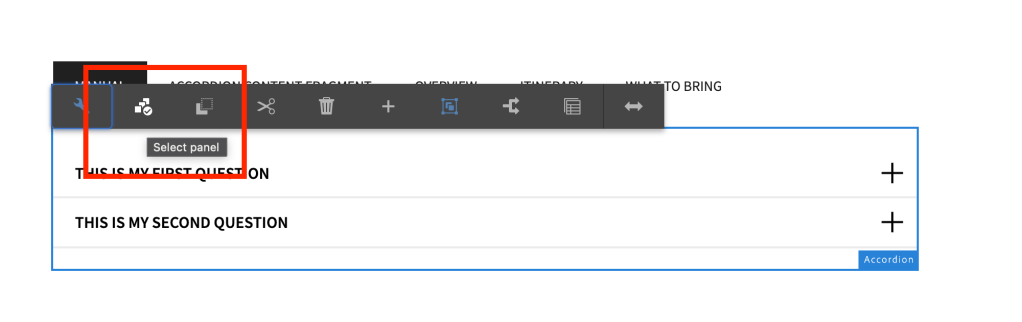
Click on the panel selector icon and go to the individual item and make necessary changes
Panel SelectionAuthor answer
You can view it as published as shown below:
Published view of the Q&A
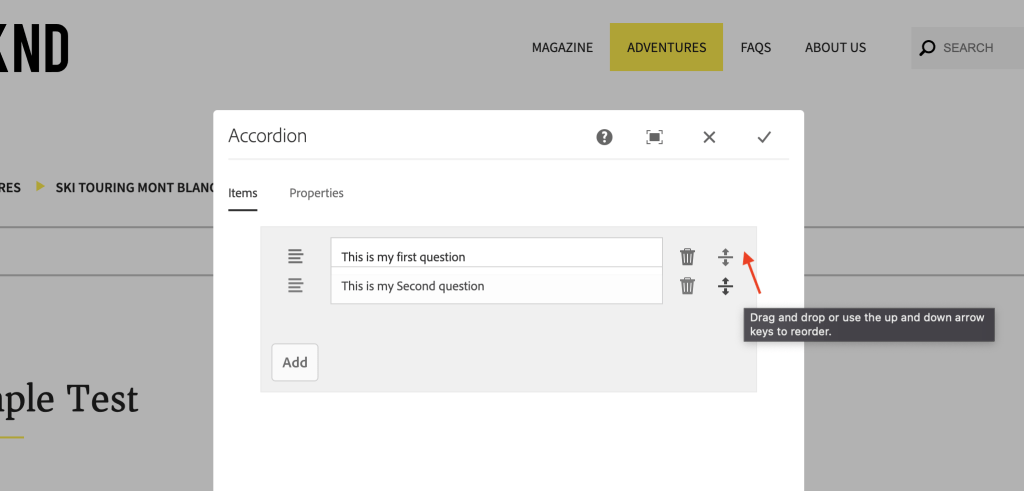
You can also rearrange the order of results from dialog
Dialog level reordering
Automated process:
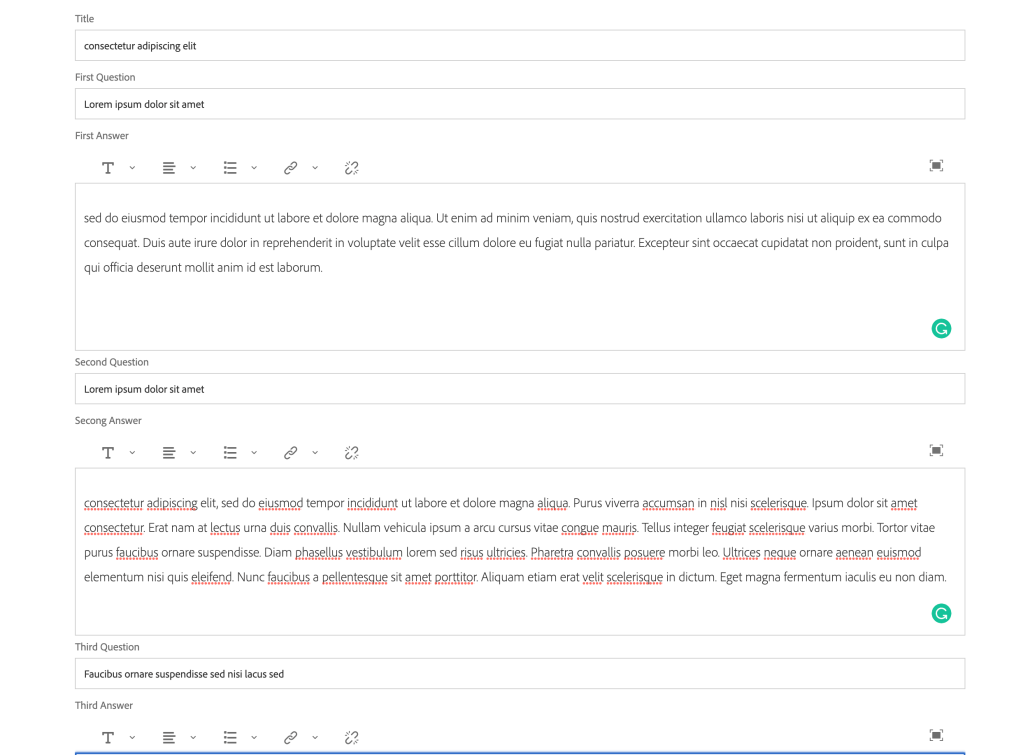
Create a Sample model which can have a max of 10 Q&A’s as shown below:
Q&A content fragment
Create a custom Accordion component as shown below:
You can author the component by selecting the fragment path.
Notes: Please make sure we don’t author anything manually by clicking on add item
Author content fragment path
After authoring you can reload the page to see the content is being populated into the accordion model and all the changes made on the content fragment will be pulled into the component
Content fragment data is pulled automatically
You can also rearrange the order of the FAQ from dialog level or from the panel selector.
Rearrange from panel selector
Flexibility Vs Automation:
This component will automatically pull Q&A from content fragment but if there is any update on the question field then it won’t reflect hence please remove the field which is not pulling the latest results and refresh the page so that it pulls the latest.
Why are we seeing above issue?
We are unable to pull the updated questions into the component because this will remove the flexibility of rearranging the panels. Based on your requirement you can remove this functionality.
How to clean up the growing repo? How to safely delete all the unwanted assets and pages.
Requirement:
Find the references of all the assets and pages and clean up unreferenced assets and unwanted pages.
Introduction:
You can call the below process as asset, pages references report.
Usually, with growing repo size, we usually do logs rotation and archiving, we also do some compactions (Revision cleanup).
What if we could remove some of the deactivated and unreferenced assets or pages?
How to find references of assets or pages?
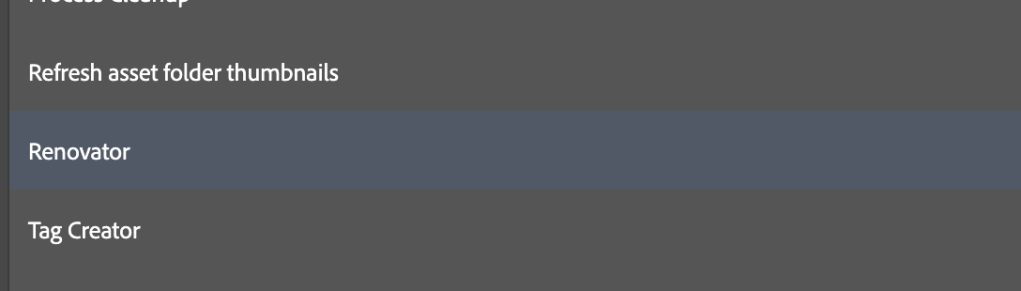
Go to the following url https://{domain}/apps/acs-commons/content/manage-controlled-processes.html and click on Start Process and select Renovator process as shown below:
Start ProcessRenovator Process
I am trying to check the references of all the assets under the following path:
Source path: /content/dam/wknd/en/activities
And select some random path into the Destination path: /content/dam/wknd/en/magazine
And please do make sure to check the Dry run and Detailed Report checkboxes, if not checked all the assets will be moved to the new folder i.e, /content/dam/wknd/en/magazine
Process fields selections
Once you start the process you would see the process take some time to run and you can click on the process and open the view or download the excel report as shown:
Process result pageView the results popup
Once downloaded delete the following columns:
Remove unwanted columns
You can see some of the rows have empty references and if you think these assets are no more required then you can remove them
Unreferenced rows
How to remove the unreferenced assets or pages safely?
You can run through the above steps on any of the folders and please make sure to avoid running on root folders or pages like: /content/dam or /content or home pages because would slow down the servers
For more information on how to use the renovator process for
How to track Text component using ACDL? How to track the links inside a text component using ACDL? Can I add the custom ID to the links?
Requirement:
Track all the hyperlinks inside the text component using ACDL and add also provide a custom ID to track the links.
Introduction:
The goal of the Adobe Client Data Layer is to reduce the effort to instrument websites by providing a standardized method to expose and access any kind of data for any script.
The Adobe Client Data Layer is platform agnostic, but is fully integrated into the Core Components for use with AEM.
You can also learn more about the OOTB core text component here and also you can learn more about the Adobe Client data layerhere. You can also learn about how to create tracking for the custom component here.
In the following example, we are going to use component delegation to delegate the OOTB text component and enable custom tracking on the text component, you can learn more about component delegation here.
Add a JSOUP and Lombok dependency to your project.
Add a service called JSONConverter as shown below:
package com.adobe.aem.guides.wknd.core.service;

import com.fasterxml.jackson.databind.util.JSONPObject;

/**
 * Interface to deal with Json.
 */
public interface JSONConverter {

    /**
     * Convert Json Object to given object
     *
     * @param jsonpObject
     * @param clazz       type of class
     * @return @{@link Object}
     */
    @SuppressWarnings("rawtypes")
    Object convertToObject(JSONPObject jsonpObject, Class clazz);

    /**
     * Convert Json Object to given object
     *
     * @param jsonString
     * @param clazz      type of class
     * @return @{@link Object}
     */
    @SuppressWarnings("rawtypes")
    Object convertToObject(String jsonString, Class clazz);

    /**
     * Convert Json Object to given object
     *
     * @param object
     * @return @{@link String}
     */
    String convertToJsonString(Object object);

    /**
     * Convert Json Object to given object
     *
     * @param object
     * @return @{@link JSONPObject}
     */
    JSONPObject convertToJSONPObject(Object object);
}
Add a Service implementation JSONConverterImpl to convert object to JSON String using Object Mapper API
package com.adobe.aem.guides.wknd.core.service.impl;

import com.adobe.aem.guides.wknd.core.service.JSONConverter;
import com.fasterxml.jackson.annotation.JsonInclude.Include;
import com.fasterxml.jackson.databind.ObjectMapper;
import com.fasterxml.jackson.databind.util.JSONPObject;
import org.osgi.service.component.annotations.Component;
import org.slf4j.Logger;
import org.slf4j.LoggerFactory;
import java.io.IOException;

@Component(service = JSONConverter.class)
public class JSONConverterImpl implements JSONConverter {

    private static final Logger LOG = LoggerFactory.getLogger(JSONConverterImpl.class);

    @SuppressWarnings("unchecked")
    @Override
    public Object convertToObject(JSONPObject jsonpObject, @SuppressWarnings("rawtypes") Class clazz) {
        ObjectMapper mapper = new ObjectMapper();
        try {
            return mapper.readValue(jsonpObject.toString(), clazz);
        } catch (IOException e) {
            LOG.debug("IOException while converting JSON to {} class {}", clazz.getName(), e.getMessage());
        }
        return null;
    }

    @SuppressWarnings("unchecked")
    @Override
    public Object convertToObject(String jsonString, @SuppressWarnings("rawtypes") Class clazz) {
        ObjectMapper mapper = new ObjectMapper();
        try {
            return mapper.readValue(jsonString, clazz);
        } catch (IOException e) {
            LOG.debug("IOException while converting JSON to {} class {}", clazz.getName(), e.getMessage());
        }
        return null;
    }

    @Override
    public String convertToJsonString(Object object) {
        ObjectMapper mapper = new ObjectMapper();
        try {
            return mapper.setSerializationInclusion(Include.NON_EMPTY).writerWithDefaultPrettyPrinter().writeValueAsString(object);
        } catch (IOException e) {
            LOG.debug("IOException while converting object {} to Json String {}", object.getClass().getName(),
                    e.getMessage());
        }
        return null;
    }

    @Override
    public JSONPObject convertToJSONPObject(Object object) {
        ObjectMapper mapper = new ObjectMapper();
        try {
            String jsonString = mapper.writeValueAsString(object);
            return mapper.readValue(jsonString, JSONPObject.class);
        } catch (IOException e) {
            LOG.debug("IOException while converting object {} to Json String {}", object.getClass().getName(),
                    e.getMessage());
        }
        return null;
    }
}
Create TexModelImpl Sling model class which will be extending OOTB Text component and add delegate to override default getText() method.
Create a custom method called addLinkTracking and JSOUP API to read the text and get all the hyperlinks, once you have all the hyperlinks you can add custom tracking code by calling getLinkData method and this method should take care of custom ID tracking or generating default ID for all the links.
package com.adobe.aem.guides.wknd.core.models.impl;

import com.adobe.aem.guides.wknd.core.service.JSONConverter;
import com.adobe.cq.export.json.ComponentExporter;
import com.adobe.cq.export.json.ExporterConstants;
import com.adobe.cq.wcm.core.components.models.Text;
import com.adobe.cq.wcm.core.components.util.ComponentUtils;
import com.day.cq.wcm.api.Page;
import com.day.cq.wcm.api.components.ComponentContext;
import lombok.experimental.Delegate;
import org.apache.commons.lang3.StringUtils;
import org.apache.sling.api.SlingHttpServletRequest;
import org.apache.sling.api.resource.Resource;
import org.apache.sling.models.annotations.*;
import org.apache.sling.models.annotations.injectorspecific.*;
import org.apache.sling.models.annotations.via.ResourceSuperType;
import org.jsoup.Jsoup;
import org.jsoup.nodes.Document;
import org.jsoup.nodes.Element;
import org.jsoup.select.Elements;
import java.util.HashMap;
import java.util.Map;
import java.util.concurrent.atomic.AtomicInteger;

@Model(adaptables = SlingHttpServletRequest.class, adapters = {Text.class, ComponentExporter.class}, resourceType = TextModelImpl.RESOURCE_TYPE, defaultInjectionStrategy = DefaultInjectionStrategy.OPTIONAL)
@Exporter(name = ExporterConstants.SLING_MODEL_EXPORTER_NAME, extensions = ExporterConstants.SLING_MODEL_EXTENSION)
public class TextModelImpl implements Text {

    public static final String RESOURCE_TYPE = "wknd/components/text";

    @SlingObject
    protected Resource resource;

    @ScriptVariable(injectionStrategy = InjectionStrategy.OPTIONAL)
    private ComponentContext componentContext;

    @ScriptVariable(injectionStrategy = InjectionStrategy.OPTIONAL)
    private Page currentPage;

    @ValueMapValue(injectionStrategy = InjectionStrategy.OPTIONAL)
    @Default(values=StringUtils.EMPTY)
    protected String id;

    @OSGiService
    private JSONConverter jsonConverter;

    @Self
    @Via(type = ResourceSuperType.class)
    @Delegate(excludes = DelegationExclusion.class)
    private Text text;

    @Override
    public String getText() {
        return addLinkTracking(text.getText());
    }

    private String addLinkTracking(String text) {
        if(StringUtils.isNotEmpty(text) && (ComponentUtils.isDataLayerEnabled(resource) || resource.getPath().contains("/content/experience-fragments"))) {
            Document doc = Jsoup.parse(text);
            Elements anchors = doc.select("a");
            AtomicInteger counter = new AtomicInteger(1);
            anchors.stream().forEach(anch -> {
                anch.attr("data-cmp-clickable", true);
                anch.attr("data-cmp-data-layer", getLinkData(anch, counter.getAndIncrement()));
            });
            return doc.body().html();
        }
        return text;
    }

    public String getLinkData(Element anchor, int count) {
        //Create a map of properties we want to expose
        Map<String, Object> textLinkProperties = new HashMap<>();
        textLinkProperties.put("@type", resource.getResourceType()+"/link");
        textLinkProperties.put("dc:title", anchor.text());
        textLinkProperties.put("xdm:linkURL", anchor.attr("href"));

        //Use AEM Core Component utils to get a unique identifier for the Byline component (in case multiple are on the page)
        String textLinkID;
        if(StringUtils.isEmpty(id)) {
            textLinkID = ComponentUtils.getId(resource, this.currentPage, this.componentContext) + ComponentUtils.ID_SEPARATOR + ComponentUtils.generateId("link", resource.getPath()+anchor.text());
        } else {
            textLinkID = ComponentUtils.getId(resource, this.currentPage, this.componentContext) + ComponentUtils.ID_SEPARATOR + "link-" + count;
        }
        // Return the bylineProperties as a JSON String with a key of the bylineResource's ID
        return String.format("{\"%s\":%s}",
                textLinkID,
                jsonConverter.convertToJsonString(textLinkProperties));
    }

    private interface DelegationExclusion {
        String getText();
    }
}
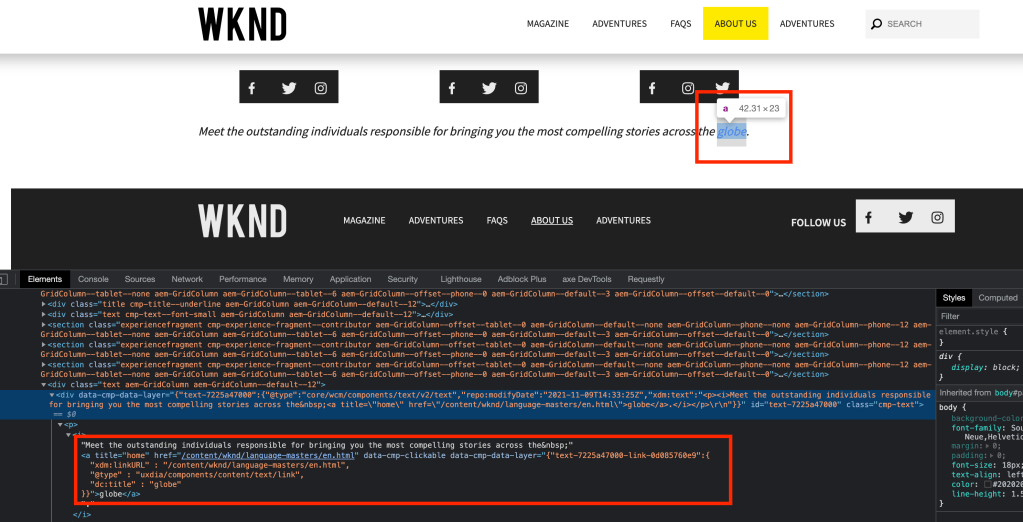
Check the default tracking for hyperlinks inside the text component
auto generated link tracking
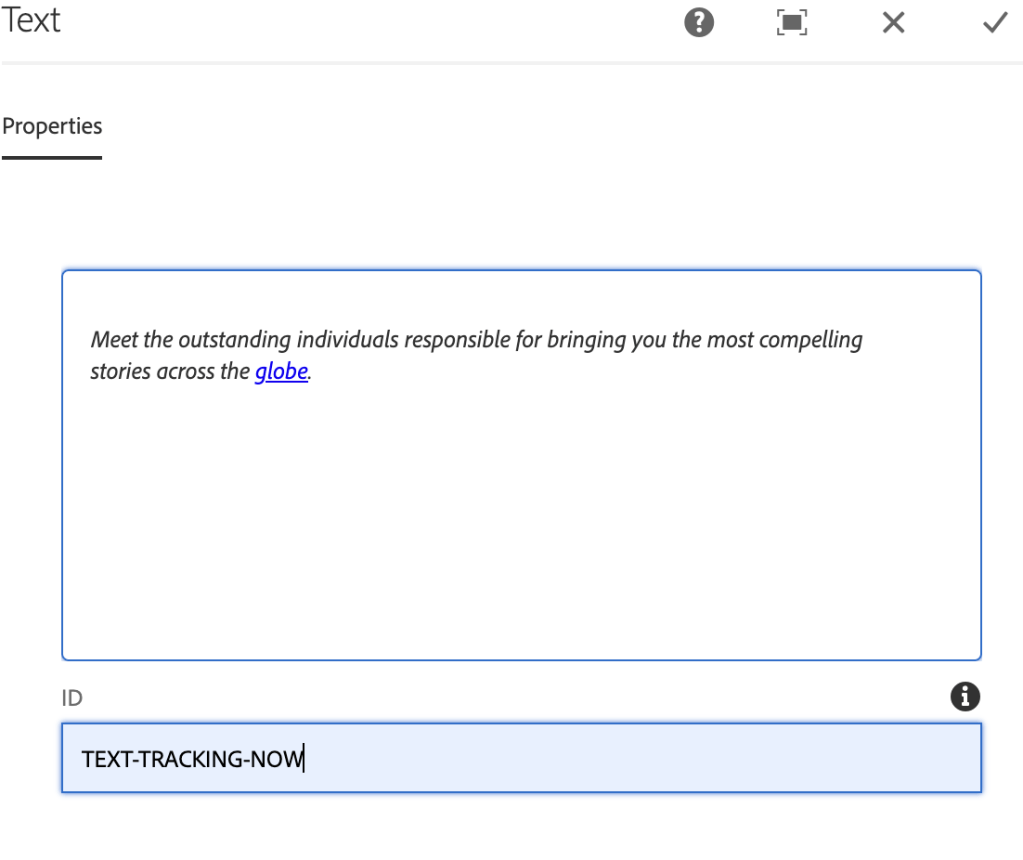
Add a custom ID to the component as shown below:
tracking ID field
In the below screenshot, we can see a custom tracking ID added to the link and each link will be called has 1, 2, 3 …
custom tracking ID for each linkclick event getting captured
What is ACDL? How to use ACDL within AEM? How to add custom ID for component tracking
Requirement:
Enable ACDL on the project and track the events and add provide ID for component tracking instead of using auto generated HEX value
Introduction:
The Adobe Client Data Layer introduces a standard method to collect and store data about a visitors experience on a webpage and then make it easy to access this data. The Adobe Client Data Layer is platform agnostic but is fully integrated into the Core Components for use with AEM.
You can also visit the article to enable ACDL on your project, you can go through the document to understand its usage.
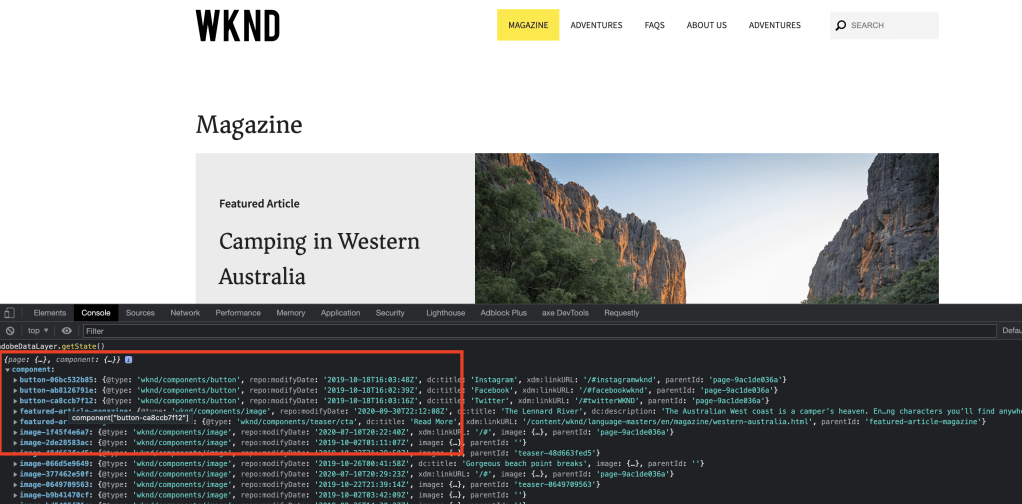
After enabling on the site you can see the datalayer for each component:
Enter adobeDataLayer.getState() in browser console
component datalayer
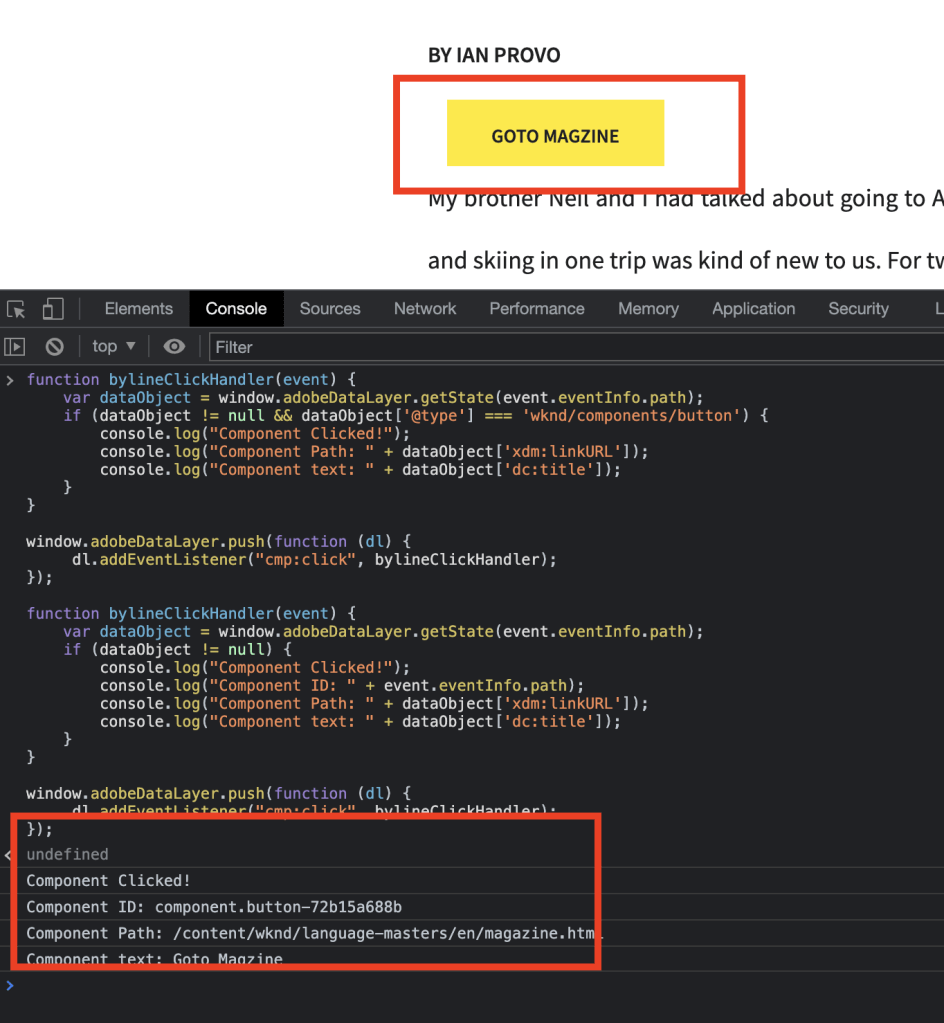
You can paste the following JS script on the console to test button clicks on the page
Create a package for a list of paths using the ACS commons query package tool
Introduction:
Usually, when we try to create a package of content from the lowers or prod environment, we provide a list of pages we are trying to create a package for by going into the edit.
Add filters
What about the assets related to those pages? Again, you need to get the list of assets and edit the package.
Is there a way we can create a package using the ACS Commons tool?
How to bulk replicate (Publish/Unpublish) pages in AEM using MCP?
Requirement:
Use bulk replication other than the OOTB tree activation tool and using MCP add a different replication agent instead of the default agent.
Introduction:
Usually for bulk replication we usually use the OOTB tree activation page and select the path to start the bulk replication i.e, activation only.
Activation Treestart path and activate
MCP provides an easier way and with better UI to run bulk activation. You can also create a separate replication agent other than default agent so that existing authoring replication or existing schedulers won’t be blocked.
You can use the MCP queue to replicate synchronously and the default queue to replicate asynchronously. For pages more than 10K its recommended to use MCP 10k Queue
Select the Tree Activation:
Go to MCP page url: http://{domain}/apps/acs-commons/content/manage-controlled-processes.html
Select Tree Activation process
Provide the path of the page and select all for “What to Publish” and MCP Queue based on your requirement.
Provide an agent if you are using a different agent for bulk replication and select action to bulk publish or unpublish the pages.
AEM doesn’t support the move option for bulk selection of pages. Hence, there is a need to find a way to bulk move pages from one location to another location and update their references.
Requirement:
This article discusses the problem of bulk moving pages from one location to another location in Adobe Experience Manager (AEM) and introduces the MCP Renovator process as a solution. It also provides step-by-step instructions on how to use an Excel sheet and the Renovator process to move pages, update references, deactivate and delete moved pages, and publish moved references and pages.
Bulk move some of the pages from one location to another location
Update the references on the page.
Deactivate moved pages and delete
Publish moved references
Publish moved pages
Introduction:
Out of the box, AEM doesn’t support the move option/operation for more than one selection of pages. However, we can use the MCP renovator process to bulk move the existing pages from one location to another location.
Create an Excel sheet containing the following columns:
Source – source path of the page
Destination – destination path and if you want to rename the page you do as well
In the above example, the magazine page will be renamed to revenue
Go to the MCP process path http://{domain}}/apps/acs-commons/content/manage-controlled-processes.html, select Renovator process upload the Excel sheet and use the following options as per your needs. If you select replication MCP queue will activate only references but won’t activate the moved pages.
Renovator process
Dry run the process to validate for any errors in the Excel sheet and select the detailed report to view complete move-related changes.
Renovator satisfy all 5 requirements but for the 6th requirement, you can use the below process to activate all the moved pages and you upload the same excel sheet and below process will only look into the destination column AEM Publish / UnPublish / Delete List of pages – MCP Process






















 AEM best practices and development guide