AEM Asset (Repo) Cleanup – ACS Commons Renovator

Problem Statement:

How to clean up the growing repo? How to safely delete all the unwanted assets and pages.

Requirement:

Find the references of all the assets and pages and clean up unreferenced assets and unwanted pages.

Introduction:

You can call the below process as asset, pages references report.

Usually, with growing repo size, we usually do logs rotation and archiving, we also do some compactions (Revision cleanup).

What if we could remove some of the deactivated and unreferenced assets or pages?

How to find references of assets or pages?

Go to the following url https://{domain}/apps/acs-commons/content/manage-controlled-processes.html and click on Start Process and select Renovator process as shown below:

Start Process
Renovator Process

I am trying to check the references of all the assets under the following path:

Source path: /content/dam/wknd/en/activities

And select some random path into the Destination path: /content/dam/wknd/en/magazine

And please do make sure to check the Dry run and Detailed Report checkboxes, if not checked all the assets will be moved to the new folder i.e, /content/dam/wknd/en/magazine

Process fields selections

Once you start the process you would see the process take some time to run and you can click on the process and open the view or download the excel report as shown:

Process result page
View the results popup

Once downloaded delete the following columns:

Remove unwanted columns

You can see some of the rows have empty references and if you think these assets are no more required then you can remove them

Unreferenced rows

How to remove the unreferenced assets or pages safely?

Use the following resource to learn more about:

AEM Publish / UnPublish / Delete List of pages – MCP Process

You can run through the above steps on any of the folders and please make sure to avoid running on root folders or pages like: /content/dam or /content or home pages because would slow down the servers

For more information on how to use the renovator process for

AEM Bulk move pages – MCP

AEM Text component tracking – Adobe Client Datalayer

Problem Statement:

How to track Text component using ACDL? How to track the links inside a text component using ACDL? Can I add the custom ID to the links?

Requirement:

Track all the hyperlinks inside the text component using ACDL and add also provide a custom ID to track the links.

Introduction:

The goal of the Adobe Client Data Layer is to reduce the effort to instrument websites by providing a standardized method to expose and access any kind of data for any script.

The Adobe Client Data Layer is platform agnostic, but is fully integrated into the Core Components for use with AEM.

You can also learn more about the OOTB core text component here and also you can learn more about the Adobe Client data layer here. You can also learn about how to create tracking for the custom component here.

In the following example, we are going to use component delegation to delegate the OOTB text component and enable custom tracking on the text component, you can learn more about component delegation here.

Add a JSOUP and Lombok dependency to your project.

<dependency>
	<groupId>org.jsoup</groupId>
	<artifactId>jsoup</artifactId>
	<version>1.13.1</version>
	<scope>provided</scope>
</dependency>
<dependency>
	<groupId>org.projectlombok</groupId>
	<artifactId>lombok</artifactId>
	<version>1.18.20</version>
	<scope>provided</scope>
</dependency>

Add a service called JSONConverter as shown below:

package com.adobe.aem.guides.wknd.core.service;

import com.fasterxml.jackson.databind.util.JSONPObject;

/**
 * Interface to deal with Json.
 */
public interface JSONConverter {

    /**
     * Convert Json Object to given object
     *
     * @param jsonpObject
     * @param clazz       type of class
     * @return @{@link Object}
     */
    @SuppressWarnings("rawtypes")
    Object convertToObject(JSONPObject jsonpObject, Class clazz);

    /**
     * Convert Json Object to given object
     *
     * @param jsonString
     * @param clazz      type of class
     * @return @{@link Object}
     */
    @SuppressWarnings("rawtypes")
    Object convertToObject(String jsonString, Class clazz);

    /**
     * Convert Json Object to given object
     *
     * @param object
     * @return @{@link String}
     */
    String convertToJsonString(Object object);

    /**
     * Convert Json Object to given object
     *
     * @param object
     * @return @{@link JSONPObject}
     */
    JSONPObject convertToJSONPObject(Object object);
}

Add a Service implementation JSONConverterImpl to convert object to JSON String using Object Mapper API

package com.adobe.aem.guides.wknd.core.service.impl;

import com.adobe.aem.guides.wknd.core.service.JSONConverter;
import com.fasterxml.jackson.annotation.JsonInclude.Include;
import com.fasterxml.jackson.databind.ObjectMapper;
import com.fasterxml.jackson.databind.util.JSONPObject;
import org.osgi.service.component.annotations.Component;
import org.slf4j.Logger;
import org.slf4j.LoggerFactory;
import java.io.IOException;

@Component(service = JSONConverter.class)
public class JSONConverterImpl implements JSONConverter {

    private static final Logger LOG = LoggerFactory.getLogger(JSONConverterImpl.class);

    @SuppressWarnings("unchecked")
    @Override
    public Object convertToObject(JSONPObject jsonpObject, @SuppressWarnings("rawtypes") Class clazz) {
        ObjectMapper mapper = new ObjectMapper();
        try {
            return mapper.readValue(jsonpObject.toString(), clazz);
        } catch (IOException e) {
            LOG.debug("IOException while converting JSON to {} class {}", clazz.getName(), e.getMessage());
        }
        return null;
    }

    @SuppressWarnings("unchecked")
    @Override
    public Object convertToObject(String jsonString, @SuppressWarnings("rawtypes") Class clazz) {
        ObjectMapper mapper = new ObjectMapper();
        try {
            return mapper.readValue(jsonString, clazz);
        } catch (IOException e) {
            LOG.debug("IOException while converting JSON to {} class {}", clazz.getName(), e.getMessage());
        }
        return null;
    }

    @Override
    public String convertToJsonString(Object object) {
        ObjectMapper mapper = new ObjectMapper();
        try {
            return mapper.setSerializationInclusion(Include.NON_EMPTY).writerWithDefaultPrettyPrinter().writeValueAsString(object);
        } catch (IOException e) {
            LOG.debug("IOException while converting object {} to Json String {}", object.getClass().getName(),
                    e.getMessage());
        }
        return null;
    }

    @Override
    public JSONPObject convertToJSONPObject(Object object) {
        ObjectMapper mapper = new ObjectMapper();
        try {
            String jsonString = mapper.writeValueAsString(object);
            return mapper.readValue(jsonString, JSONPObject.class);
        } catch (IOException e) {
            LOG.debug("IOException while converting object {} to Json String {}", object.getClass().getName(),
                    e.getMessage());
        }
        return null;
    }
}

Create TexModelImpl Sling model class which will be extending OOTB Text component and add delegate to override default getText() method.

Create a custom method called addLinkTracking and JSOUP API to read the text and get all the hyperlinks, once you have all the hyperlinks you can add custom tracking code by calling getLinkData method and this method should take care of custom ID tracking or generating default ID for all the links.

package com.adobe.aem.guides.wknd.core.models.impl;

import com.adobe.aem.guides.wknd.core.service.JSONConverter;
import com.adobe.cq.export.json.ComponentExporter;
import com.adobe.cq.export.json.ExporterConstants;
import com.adobe.cq.wcm.core.components.models.Text;
import com.adobe.cq.wcm.core.components.util.ComponentUtils;
import com.day.cq.wcm.api.Page;
import com.day.cq.wcm.api.components.ComponentContext;
import lombok.experimental.Delegate;
import org.apache.commons.lang3.StringUtils;
import org.apache.sling.api.SlingHttpServletRequest;
import org.apache.sling.api.resource.Resource;
import org.apache.sling.models.annotations.*;
import org.apache.sling.models.annotations.injectorspecific.*;
import org.apache.sling.models.annotations.via.ResourceSuperType;
import org.jsoup.Jsoup;
import org.jsoup.nodes.Document;
import org.jsoup.nodes.Element;
import org.jsoup.select.Elements;
import java.util.HashMap;
import java.util.Map;
import java.util.concurrent.atomic.AtomicInteger;

@Model(adaptables = SlingHttpServletRequest.class, adapters = {Text.class, ComponentExporter.class}, resourceType = TextModelImpl.RESOURCE_TYPE, defaultInjectionStrategy = DefaultInjectionStrategy.OPTIONAL)
@Exporter(name = ExporterConstants.SLING_MODEL_EXPORTER_NAME, extensions = ExporterConstants.SLING_MODEL_EXTENSION)
public class TextModelImpl implements Text {

    public static final String RESOURCE_TYPE = "wknd/components/text";

    @SlingObject
    protected Resource resource;

    @ScriptVariable(injectionStrategy = InjectionStrategy.OPTIONAL)
    private ComponentContext componentContext;

    @ScriptVariable(injectionStrategy = InjectionStrategy.OPTIONAL)
    private Page currentPage;

    @ValueMapValue(injectionStrategy = InjectionStrategy.OPTIONAL)
    @Default(values=StringUtils.EMPTY)
    protected String id;

    @OSGiService
    private JSONConverter jsonConverter;

    @Self
    @Via(type = ResourceSuperType.class)
    @Delegate(excludes = DelegationExclusion.class)
    private Text text;

    @Override
    public String getText() {
        return addLinkTracking(text.getText());
    }

    private String addLinkTracking(String text) {
        if(StringUtils.isNotEmpty(text) && (ComponentUtils.isDataLayerEnabled(resource) || resource.getPath().contains("/content/experience-fragments"))) {
            Document doc = Jsoup.parse(text);
            Elements anchors = doc.select("a");
            AtomicInteger counter = new AtomicInteger(1);
            anchors.stream().forEach(anch -> {
                anch.attr("data-cmp-clickable", true);
                anch.attr("data-cmp-data-layer", getLinkData(anch, counter.getAndIncrement()));
            });
            return doc.body().html();
        }
        return text;
    }

    public String getLinkData(Element anchor, int count) {
        //Create a map of properties we want to expose
        Map<String, Object> textLinkProperties = new HashMap<>();
        textLinkProperties.put("@type", resource.getResourceType()+"/link");
        textLinkProperties.put("dc:title", anchor.text());
        textLinkProperties.put("xdm:linkURL", anchor.attr("href"));

        //Use AEM Core Component utils to get a unique identifier for the Byline component (in case multiple are on the page)                        
        String textLinkID;
        if(StringUtils.isEmpty(id)) {
            textLinkID = ComponentUtils.getId(resource, this.currentPage, this.componentContext) + ComponentUtils.ID_SEPARATOR + ComponentUtils.generateId("link", resource.getPath()+anchor.text());
        } else {
            textLinkID = ComponentUtils.getId(resource, this.currentPage, this.componentContext) + ComponentUtils.ID_SEPARATOR + "link-" + count;
        }
        // Return the bylineProperties as a JSON String with a key of the bylineResource's ID
        return String.format("{\"%s\":%s}",
                textLinkID,
                jsonConverter.convertToJsonString(textLinkProperties));
    }

    private interface DelegationExclusion {
        String getText();
    }
}

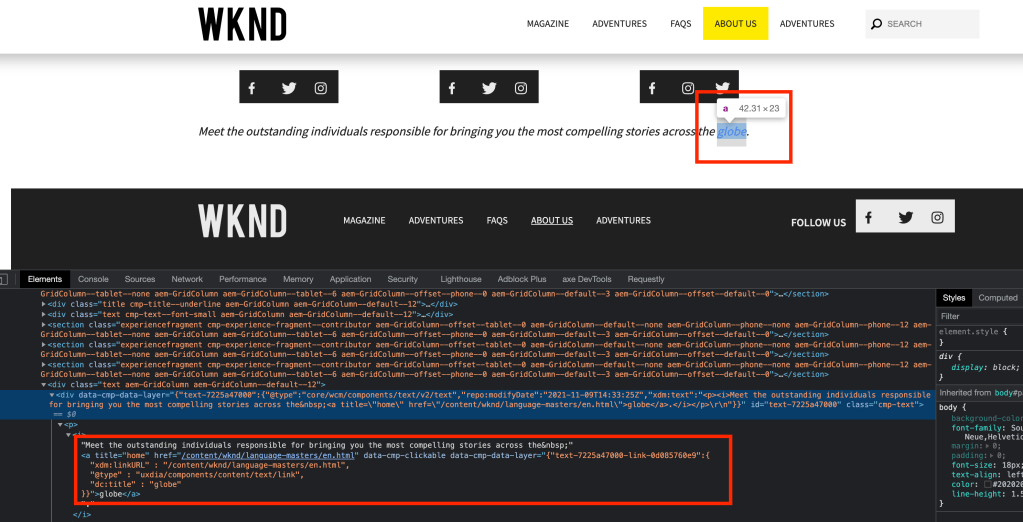
Check the default tracking for hyperlinks inside the text component

auto generated link tracking

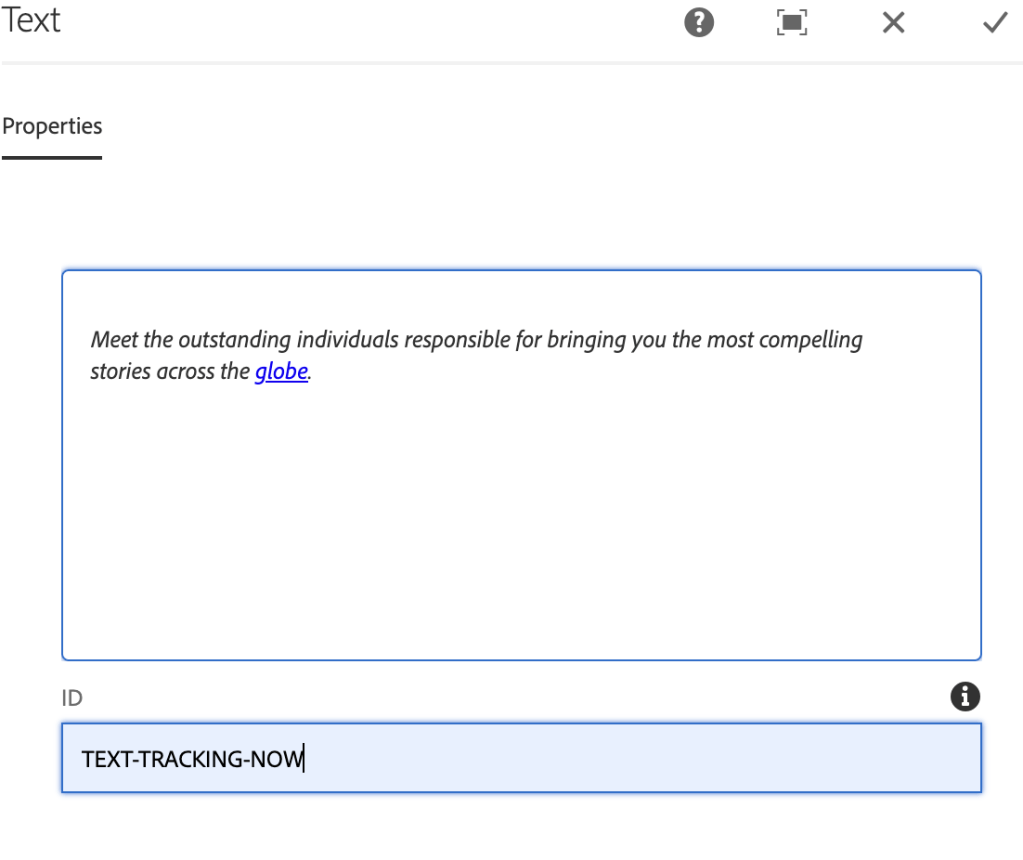
Add a custom ID to the component as shown below:

tracking ID field

In the below screenshot, we can see a custom tracking ID added to the link and each link will be called has 1, 2, 3 …

custom tracking ID for each link
click event getting captured

You can also learn more about
AEM ACDL (Adobe Client Data Layer) tracking – Core Component

AEM ACDL (Adobe Client Data Layer) tracking – Core Component

Problem Statement:

What is ACDL? How to use ACDL within AEM? How to add custom ID for component tracking

Requirement:

Enable ACDL on the project and track the events and add provide ID for component tracking instead of using auto generated HEX value

Introduction:

The Adobe Client Data Layer introduces a standard method to collect and store data about a visitors experience on a webpage and then make it easy to access this data. The Adobe Client Data Layer is platform agnostic but is fully integrated into the Core Components for use with AEM.

You can also visit the article to enable ACDL on your project, you can go through the document to understand its usage.

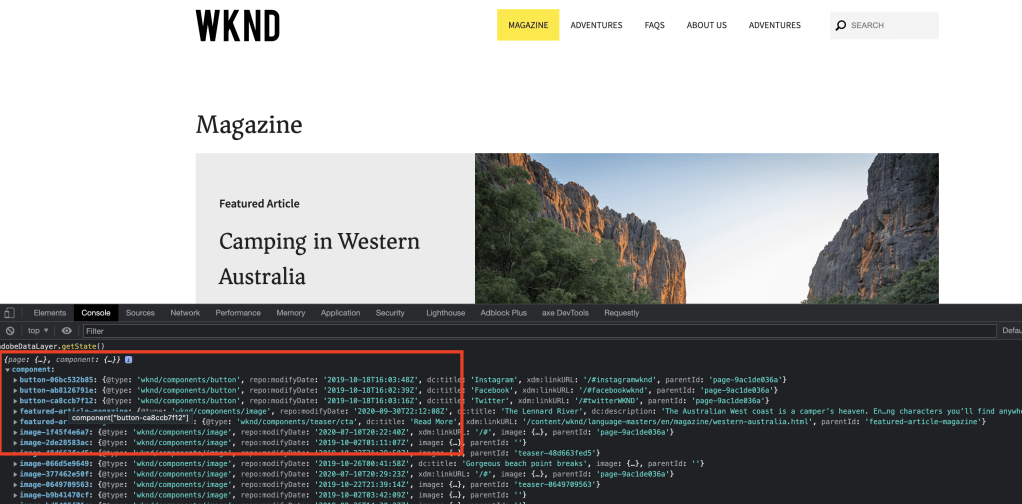
After enabling on the site you can see the datalayer for each component:

Enter adobeDataLayer.getState() in browser console

component datalayer

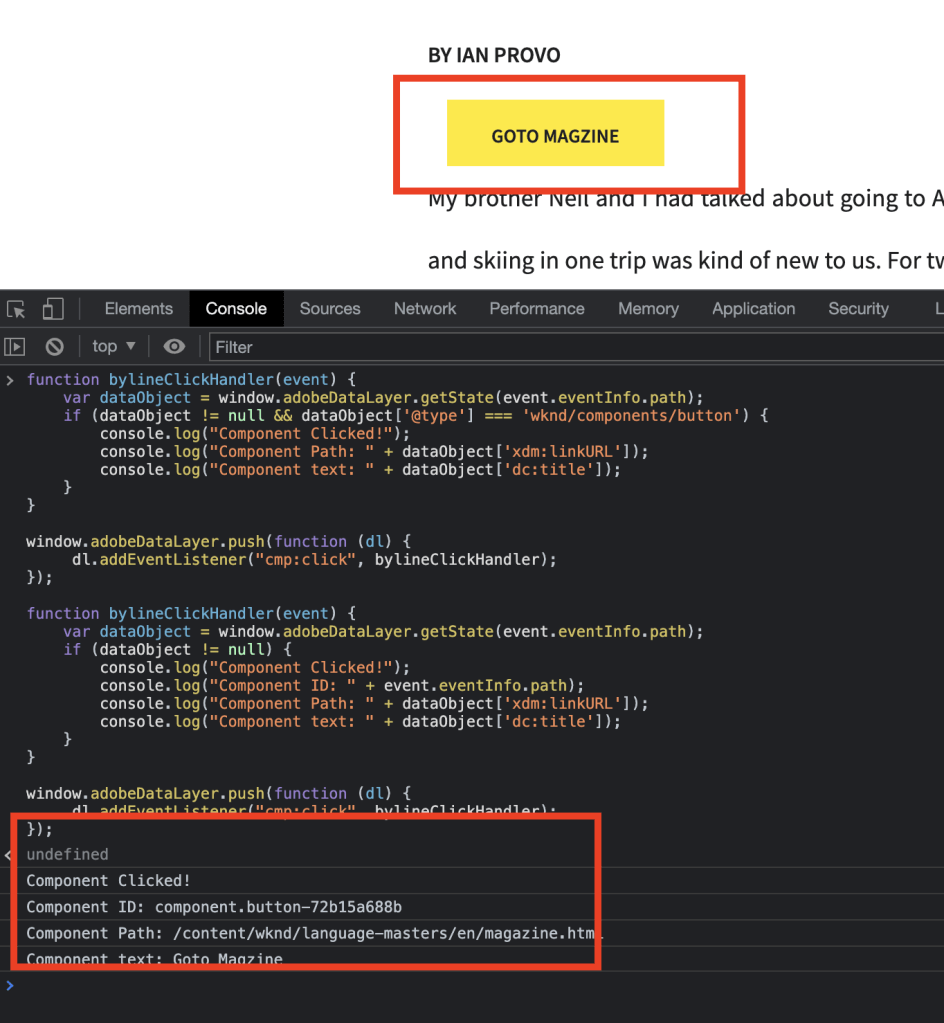
You can paste the following JS script on the console to test button clicks on the page

function bylineClickHandler(event) {
    var dataObject = window.adobeDataLayer.getState(event.eventInfo.path);
    if (dataObject != null && dataObject['@type'] === 'wknd/components/button') {  
        console.log("Component Clicked!");      
        console.log("Component Path: " + dataObject['xdm:linkURL']);        
        console.log("Component text: " + dataObject['dc:title']);
    }
}

window.adobeDataLayer.push(function (dl) {
     dl.addEventListener("cmp:click", bylineClickHandler);
});
tracking button click event

You can also change the component ID to a readable ID for tracking purposes by adding ID field details inside the component

ID field

Now you can see the readable ID added to the button component

button component with id details

You can go through the following document to track the events in Adobe Analytics

AEM Create package using a list of paths

Problem Statement:

How to create a package using a list of paths?

Requirement:

Create a package for a list of paths using the ACS commons query package tool

Introduction:

Usually, when we try to create a package of content from the lowers or prod environment, we provide a list of pages we are trying to create a package for by going into the edit.

Add filters

What about the assets related to those pages? Again, you need to get the list of assets and edit the package.

Is there a way we can create a package using the ACS Commons tool?

The simple answer is Yes.

Go to using http://{domain}/miscadmin#/etc/acs-commons/packagers and create a page using Query Packager template as shown:

Create Query Packager page

Open the page and edit the configuration and fill the fileds

  1. Add package details
  2. Select query language has List
  3. Paste the all the paths
  4. Make sure if you want only the page in the list then add “/jcr:content” else it will get child pages as well
  5. Save and click on create package
  6. If you want package from publisher env, then activate the page and go to the miscadmin path and click on the create package
Fill the Query configuration

Unfortunately, it won’t show if the package is created or not but if you go to crx/packmgr url you will see the package

example package

AEM MCP based Bulk Replication

Problem statement:

How to bulk replicate (Publish/Unpublish) pages in AEM using MCP?

Requirement:

Use bulk replication other than the OOTB tree activation tool and using MCP add a different replication agent instead of the default agent.

Introduction:

Usually for bulk replication we usually use the OOTB tree activation page and select the path to start the bulk replication i.e, activation only.

Activation Tree
start path and activate

MCP provides an easier way and with better UI to run bulk activation. You can also create a separate replication agent other than default agent so that existing authoring replication or existing schedulers won’t be blocked.

You can use the MCP queue to replicate synchronously and the default queue to replicate asynchronously. For pages more than 10K its recommended to use MCP 10k Queue

Select the Tree Activation:

Go to MCP page url: http://{domain}/apps/acs-commons/content/manage-controlled-processes.html

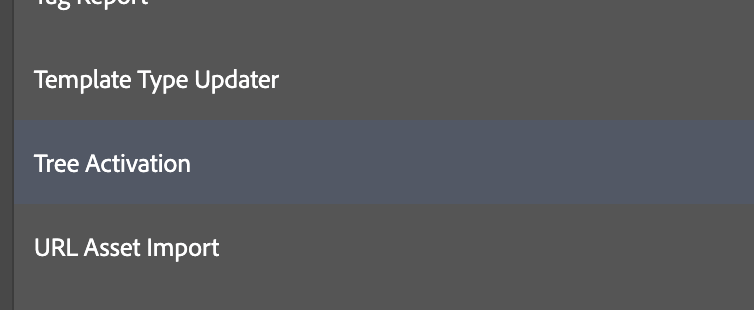
Select Tree Activation process

Provide the path of the page and select all for “What to Publish” and MCP Queue based on your requirement.

Provide an agent if you are using a different agent for bulk replication and select action to bulk publish or unpublish the pages.

Tree Activation Options

For excel sheet based activation use:

AEM Publish / UnPublish / Delete List of pages – MCP Process

AEM Bulk Move Pages with MCP Renovator Process

Problem statement:

AEM doesn’t support the move option for bulk selection of pages. Hence, there is a need to find a way to bulk move pages from one location to another location and update their references.

Requirement:

This article discusses the problem of bulk moving pages from one location to another location in Adobe Experience Manager (AEM) and introduces the MCP Renovator process as a solution. It also provides step-by-step instructions on how to use an Excel sheet and the Renovator process to move pages, update references, deactivate and delete moved pages, and publish moved references and pages.

  1. Bulk move some of the pages from one location to another location
  2. Update the references on the page.
  3. Deactivate moved pages and delete
  4. Publish moved references
  5. Publish moved pages

Introduction:

Out of the box, AEM doesn’t support the move option/operation for more than one selection of pages. However, we can use the MCP renovator process to bulk move the existing pages from one location to another location.

Create an Excel sheet containing the following columns:

  1. Source – source path of the page
  2. Destination – destination path and if you want to rename the page you do as well
bulk move Excel sheet

For Eg:

Source: /content/wknd/language-masters/en/magazine

Destination: /content/wknd/language-masters/en/revenue

In the above example, the magazine page will be renamed to revenue

Go to the MCP process path http://{domain}}/apps/acs-commons/content/manage-controlled-processes.html, select Renovator process upload the Excel sheet and use the following options as per your needs. If you select replication MCP queue will activate only references but won’t activate the moved pages.

Renovator process

Dry run the process to validate for any errors in the Excel sheet and select the detailed report to view complete move-related changes.

Process options selection

Excel sheet:

Renovator satisfy all 5 requirements but for the 6th requirement, you can use the below process to activate all the moved pages and you upload the same excel sheet and below process will only look into the destination column
AEM Publish / UnPublish / Delete List of pages – MCP Process

AEM MCP Process for publishing, unpublishing, and deleting a list of pages

Problem Statement:

Can we Publish / Un Publish / Delete the list of pages mentioned in an Excel sheet?

Requirement:

This article discusses how to use the Manage Controlled Processes (MCP) dashboard in Adobe Experience Manager (AEM) to create a process for publishing, unpublishing, and deleting a list of pages in AEM based on an Excel sheet. The article provides code snippets for creating the ListTreeReplicationFactory service and implementation class called ListTreeReplication that reads the Excel sheet and performs the desired actions on the specified pages.

Create an MCP process to Publish / Un Publish / Delete the list of pages mentioned in an Excel sheet.

Introduction:

Usually, product owners or authors would like to Publish certain pages like offer/product/article pages based on business requirements and also would like to unpublish and delete to clean up the pages which are unnecessary.

This process will be really helpful during Excel sheet based migration.

MCP (Manage Controlled Processes) is both a dashboard for performing complex tasks and a rich API for defining these tasks as process definitions. In addition to kicking off new processes, users can also monitor running tasks, retrieve information about completed tasks, halt work, and so on.

Add the following maven dependency to your pom to extend MCP

<dependency>
    <groupId>com.adobe.acs</groupId>
    <artifactId>acs-aem-commons-bundle</artifactId>
    <version>5.0.4</version>
    <scope>provided</scope>
</dependency>

Create a new process called ListTreeReplicationFactory service using the MCP process definition

package com.mysite.mcp.process;

import org.osgi.service.component.annotations.Component;
import org.osgi.service.component.annotations.Reference;
import com.adobe.acs.commons.mcp.ProcessDefinitionFactory;
import com.day.cq.replication.Replicator;

@Component(service = ProcessDefinitionFactory.class, immediate = true)
public class ListTreeReplicationFactory extends ProcessDefinitionFactory<ListTreeReplication> {

    @Reference
    Replicator replicator;

    @Override
    public String getName() {
        return "List Tree Activation";
    }

    @Override
    protected ListTreeReplication createProcessDefinitionInstance() {
        return new ListTreeReplication(replicator);
    }
}

Create the implementation class called ListTreeReplication and add the following logic to read the excel sheet

package com.mysite.mcp.process;

import java.io.IOException;
import java.util.*;
import java.util.concurrent.atomic.AtomicInteger;
import javax.jcr.RepositoryException;
import javax.jcr.Session;
import org.apache.commons.lang3.StringUtils;
import org.apache.sling.api.request.RequestParameter;
import org.apache.sling.api.resource.LoginException;
import org.apache.sling.api.resource.PersistenceException;
import org.apache.sling.api.resource.ResourceResolver;
import com.adobe.acs.commons.data.CompositeVariant;
import com.adobe.acs.commons.data.Spreadsheet;
import com.adobe.acs.commons.fam.ActionManager;
import com.adobe.acs.commons.mcp.ProcessDefinition;
import com.adobe.acs.commons.mcp.ProcessInstance;
import com.adobe.acs.commons.mcp.form.CheckboxComponent;
import com.adobe.acs.commons.mcp.form.FileUploadComponent;
import com.adobe.acs.commons.mcp.form.FormField;
import com.adobe.acs.commons.mcp.form.SelectComponent;
import com.adobe.acs.commons.mcp.form.TextfieldComponent;
import com.adobe.acs.commons.mcp.model.GenericReport;
import com.day.cq.replication.AgentFilter;
import com.day.cq.replication.ReplicationActionType;
import com.day.cq.replication.ReplicationOptions;
import com.day.cq.replication.Replicator;
import com.day.cq.wcm.api.Page;
import com.day.cq.wcm.api.PageManager;
import com.day.cq.wcm.api.WCMException;
import org.slf4j.Logger;
import org.slf4j.LoggerFactory;

public class ListTreeReplication extends ProcessDefinition {

    private static final Logger LOGGER = LoggerFactory.getLogger(ListTreeReplication.class);
	private static final String DESTINATION_PATH = "destination";
	private final GenericReport report = new GenericReport();
	private static final String REPORT_NAME = "TreeReplication-report";
	private static final String RUNNING = "Running "; 
	private static final String EXECUTING_KEYWORD = " Tree Replication";

    protected enum QueueMethod {
        USE_PUBLISH_QUEUE, USE_MCP_QUEUE, MCP_AFTER_10K
    }

    protected enum ReplicationAction {
        PUBLISH, UNPUBLISH, DELETE
    }

    private static int ASYNC_LIMIT = 10000;

    Replicator replicatorService;

    @FormField(name = "Replication Excel", component = FileUploadComponent.class)
    private RequestParameter repPathExcel;
    private Spreadsheet spreadsheet;

    @FormField(name = "Queueing Method",
            component = SelectComponent.EnumerationSelector.class,
            description = "For small publishing tasks, standard is sufficient.  For large folder trees, MCP is recommended.",
            options = "default=USE_MCP_QUEUE")
    QueueMethod queueMethod = QueueMethod.USE_MCP_QUEUE;

    @FormField(name = "Agents",
            component = TextfieldComponent.class,
            hint = "(leave blank for default agents)",
            description = "Publish agents to use, if blank then all default agents will be used. Multiple agents can be listed using commas or regex.")
    private String agents;
    List<String> agentList = new ArrayList<>();
    AgentFilter replicationAgentFilter;

    @FormField(name = "Action",
            component = SelectComponent.EnumerationSelector.class,
            description = "Publish or Unpublish?",
            options = "default=PUBLISH")
    ReplicationAction reAction = ReplicationAction.PUBLISH;

    @FormField(name = "Dry Run",
            component = CheckboxComponent.class,
            options = "checked",
            description = "If checked, only generate a report but don't perform the work"
    )
    private boolean dryRun = true;

    public ListTreeReplication(Replicator replicator) {
        replicatorService = replicator;
    }

    @Override
    public void init() throws RepositoryException {
    	try {
            // Read spreadsheet
            spreadsheet = new Spreadsheet(repPathExcel, DESTINATION_PATH).buildSpreadsheet();
        } catch (IOException e) {
            throw new RepositoryException("Unable to process spreadsheet", e);
        }
    }

    @Override
    public void buildProcess(ProcessInstance instance, ResourceResolver rr) throws LoginException, RepositoryException {    	    	
        report.setName(REPORT_NAME);                
        instance.getInfo().setDescription(RUNNING + reAction + EXECUTING_KEYWORD);    
        if (reAction == ReplicationAction.PUBLISH) {
            instance.defineCriticalAction("Activate tree structure", rr, this::activateTreeStructure);
            if (StringUtils.isEmpty(agents)) {
                replicationAgentFilter = AgentFilter.DEFAULT;
            } else {
                agentList = Arrays.asList(agents.toLowerCase(Locale.ENGLISH).split(","));
                replicationAgentFilter = agent -> agentList.stream().anyMatch(p -> p.matches(agent.getId().toLowerCase(Locale.ENGLISH)));
            }
        } else if (reAction == ReplicationAction.UNPUBLISH) {
            instance.defineCriticalAction("Deactivate tree structure", rr, this::deactivateTreeStructure);
        } else {
        	instance.defineCriticalAction("Delete tree structure", rr, this::deleteTreeStructure);
        }
    }

    public enum ReportColumns {
        PATH, ACTION, DESCRIPTION
    }

    List<EnumMap<ReportColumns, String>> reportData = Collections.synchronizedList(new ArrayList<>());

    private void recordAction(String path, String action, String description) {
        EnumMap<ReportColumns, String> row = new EnumMap<>(ReportColumns.class);
        row.put(ReportColumns.PATH, path);
        row.put(ReportColumns.ACTION, action);
        row.put(ReportColumns.DESCRIPTION, description);
        reportData.add(row);
    }

    @Override
    public void storeReport(ProcessInstance instance, ResourceResolver rr) throws RepositoryException, PersistenceException {    	
        report.setRows(reportData, ReportColumns.class);
        report.persist(rr, instance.getPath() + "/jcr:content/report");
    }

    private void activateTreeStructure(ActionManager t) {
    	spreadsheet.getDataRowsAsCompositeVariants().forEach(row -> performReplication(t, getString(row, DESTINATION_PATH)));    	
    }

    private void deactivateTreeStructure(ActionManager t) {
    	spreadsheet.getDataRowsAsCompositeVariants().forEach(row -> performAsynchronousReplication(t, getString(row, DESTINATION_PATH)));
    }
    
    private void deleteTreeStructure(ActionManager t) {
    	spreadsheet.getDataRowsAsCompositeVariants().forEach(row -> t.deferredWithResolver(r -> deletePage(r, getString(row, DESTINATION_PATH))));
    }

    private void deletePage(ResourceResolver resourceResolver, String destinationPath) {    	
    	try {
    		final PageManager pageManager = resourceResolver.adaptTo(PageManager.class);
        	Page destinationPage = resourceResolver.resolve(destinationPath).adaptTo(Page.class);
			pageManager.delete(destinationPage, false, true);
			recordAction(destinationPath, "Deletion", "Synchronous delete");
		} catch (WCMException e) {
            LOGGER.error("unable to delete page {}", e.getMessage());
		}
	}
    
    AtomicInteger replicationCount = new AtomicInteger();

    private void performReplication(ActionManager t, String path) {
        int counter = replicationCount.incrementAndGet();
        if (queueMethod == QueueMethod.USE_MCP_QUEUE
                || (queueMethod == QueueMethod.MCP_AFTER_10K && counter >= ASYNC_LIMIT)) {
            performSynchronousReplication(t, path);
        } else {
            performAsynchronousReplication(t, path);
        }
    }

    private void performSynchronousReplication(ActionManager t, String path) {
        ReplicationOptions options = buildOptions();
        options.setSynchronous(true);
        scheduleReplication(t, options, path);
        recordAction(path, reAction == ReplicationAction.PUBLISH ? "Publish" : "Unpublish", "Synchronous replication");
    }

    private void performAsynchronousReplication(ActionManager t, String path) {
        ReplicationOptions options = buildOptions();
        options.setSynchronous(false);
        scheduleReplication(t, options, path);
        recordAction(path, reAction == ReplicationAction.PUBLISH ? "Publish" : "Unpublish", "Asynchronous replication");
    }

    private ReplicationOptions buildOptions() {
        ReplicationOptions options = new ReplicationOptions();
        options.setFilter(replicationAgentFilter);
        return options;
    }

    private void scheduleReplication(ActionManager t, ReplicationOptions options, String path) {
        if (!dryRun) {
            t.deferredWithResolver(rr -> {
                Session session = rr.adaptTo(Session.class);
                replicatorService.replicate(session, reAction == ReplicationAction.PUBLISH ? ReplicationActionType.ACTIVATE : ReplicationActionType.DEACTIVATE, path, options);
            });
        }
    }

    @SuppressWarnings({"rawtypes", "unchecked"})
    private String getString(Map<String, CompositeVariant> row, String path) {
        CompositeVariant v = row.get(path.toLowerCase(Locale.ENGLISH));
        if (v != null) {
            return (String) v.getValueAs(String.class);
        } else {
            return null;
        }
    }
}

Once the code is deployed, please go to the following URL and click on start process as shown below:

http://{domain}/apps/acs-commons/content/manage-controlled-processes.html

You will see a new process called List Tree Activation as shown below:

Click on the process

Create an excel sheet with a column called destination and add the page paths.

List Replication sheet


Note: Please make sure do not run delete before unpublish.

Excel sheet:

AEM Template Updater – Update the existing template with a new template

Problem Statement:

How can I update an existing template with a new template without moving child pages or reactivation it?

Requirement:

This article discusses how to update an existing template with a new template in AEM without moving child pages or reactivation. The article provides two methods to achieve this goal: a manual method and a programmatic method. The programmatic method uses Manage Controlled Processes (MCP), which is both a dashboard and a rich API for defining complex tasks as process definitions. The article provides a step-by-step guide to updating the template type programmatically.

  1. Update the Adventures page template from the landing page template to the Adventure page template.
  2. Avoid moving child pages from the current adventure page to the new staging location
  3. Avoid bulk activation of child pages due to movement
Create duplicate page

Introduction:

Let’s try to solve the above issue manually:

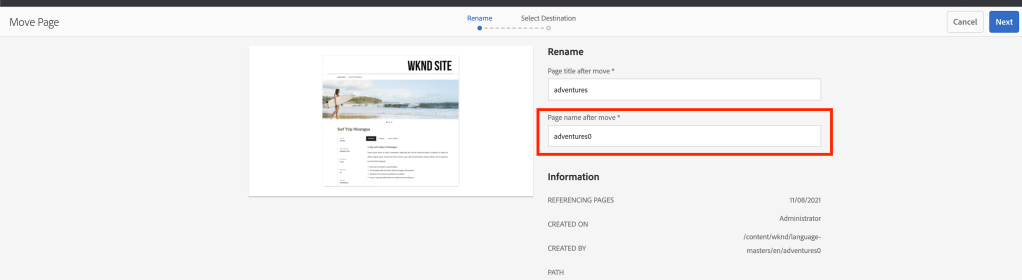
Create a new page called adventures (which will be created as adventures0) using the adventure page template.

Copy all the child pages or move page by page from the current adventures page to the new adventure page.

Copy the child pages from source to destination

Delete the current adventures page and move the adventures0 page and rename it by removing the 0

Move the page and rename

Finally, click on manage publication to publish the new adventures page and select all child pages to reactivate.

Include child pages before publishing

Let’s try to solve the above issue programmatically:

MCP (Manage Controlled Processes) is both a dashboard for performing complex tasks and a rich API for defining these tasks as process definitions. In addition to kicking off new processes, users can also monitor running tasks, retrieve information about completed tasks, halt work, and so on.

Add the following maven dependency to your pom to extend MCP

<dependency>
    <groupId>com.adobe.acs</groupId>
    <artifactId>acs-aem-commons-bundle</artifactId>
    <version>5.0.4</version>
    <scope>provided</scope>
</dependency>

Create a new MCP process called TemplateTypeUpdaterFactory service class as shown below:

package com.mysite.mcp.process;

import org.osgi.service.component.annotations.Component;
import com.adobe.acs.commons.mcp.ProcessDefinitionFactory;

@Component(service = ProcessDefinitionFactory.class, immediate = true)
public class TemplateTypeUpdaterFactory extends ProcessDefinitionFactory<TemplateTypeUpdator> {
	@Override
	public String getName() {
		return "Template Type Updater";
	}
	@Override
	protected TemplateTypeUpdator createProcessDefinitionInstance() {
		return new TemplateTypeUpdator();
	}
}

Create TemplateTypeUpdator Implementation class as shown below:

package com.mysite.mcp.process;

import java.io.IOException;
import java.text.MessageFormat;
import java.util.ArrayList;
import java.util.Collections;
import java.util.EnumMap;
import java.util.HashMap;
import java.util.List;
import java.util.Map;
import javax.jcr.Node;
import javax.jcr.RepositoryException;
import org.apache.sling.api.request.RequestParameter;
import org.apache.sling.api.resource.LoginException;
import org.apache.sling.api.resource.PersistenceException;
import org.apache.sling.api.resource.ResourceResolver;
import org.slf4j.Logger;
import org.slf4j.LoggerFactory;

import com.adobe.acs.commons.data.Spreadsheet;
import com.adobe.acs.commons.fam.ActionManager;
import com.adobe.acs.commons.mcp.ProcessDefinition;
import com.adobe.acs.commons.mcp.ProcessInstance;
import com.adobe.acs.commons.mcp.form.Description;
import com.adobe.acs.commons.mcp.form.FileUploadComponent;
import com.adobe.acs.commons.mcp.form.FormField;
import com.adobe.acs.commons.mcp.model.GenericReport;
import com.day.cq.commons.jcr.JcrConstants;
import com.day.cq.commons.jcr.JcrUtil;
import com.day.cq.wcm.api.Page;
import com.day.cq.wcm.api.PageManager;
import com.day.cq.wcm.api.WCMException;

public class TemplateTypeUpdator extends ProcessDefinition {

	private static final Logger LOGGER = LoggerFactory.getLogger(TemplateTypeUpdator.class);
	private static final String REPORT_NAME = "Page-Template-Updated";
	private static final String EXECUTING_KEYWORD = "Performs Page Template change";
	private static final String SLASH = "/";
	private static final String REPORT_SAVE_PATH = "/jcr:content/report";
	private static final String DESTINATION_COL = "duplicatepage";
	private static final String SOURCE_COL = "originalpage";
	final Map<String, String> channelPaths = Collections.synchronizedMap(new HashMap<>());
	private final List<EnumMap<ReportColumns, Object>> reportRows = new ArrayList<>();
	GenericReport genericReport = new GenericReport();

	@FormField(name = "Template Update", description = "Excel spreadsheet for performing channel type updator", component = FileUploadComponent.class, required = false)
	private RequestParameter sourceFile;

	@Override
	public void buildProcess(ProcessInstance instance, ResourceResolver rr) throws LoginException, RepositoryException {
		validateInputs();
		genericReport.setName(REPORT_NAME);
		String desc = EXECUTING_KEYWORD;
		instance.defineCriticalAction("Updating Page", rr, this::createOrUpdatePage);
		instance.getInfo().setDescription(desc);
	}

	protected void createOrUpdatePage(ActionManager manager) {
		manager.deferredWithResolver(resourceResolver -> {
			try {
				for (Map.Entry<String, String> entry : channelPaths.entrySet()) {
					final PageManager pageManager = resourceResolver.adaptTo(PageManager.class);
					Page destinationPage = resourceResolver.resolve(entry.getValue()).adaptTo(Page.class);
					Page sourcePage = resourceResolver.resolve(entry.getKey()).adaptTo(Page.class);
					pageManager.delete(sourcePage, true, false);
					JcrUtil.copy(resourceResolver.resolve(destinationPage.getPath() + SLASH + JcrConstants.JCR_CONTENT)
							.adaptTo(Node.class), sourcePage.adaptTo(Node.class), null);
					pageManager.delete(destinationPage, false, false);
					recordData(entry.getKey());
				}
				if (resourceResolver.hasChanges()) {
					resourceResolver.commit();
				}
			} catch (WCMException | RepositoryException e) {
				LOGGER.error("unable to create or update page {}", e.getMessage());
			}
		});
	}

	protected void recordData(String channelPagePath) {
		final EnumMap<ReportColumns, Object> row = new EnumMap<>(ReportColumns.class);
		row.put(ReportColumns.SERIAL, 1);
		row.put(ReportColumns.CONTENT_PATH, channelPagePath);
		reportRows.add(row);
	}

	private void validateInputs() throws RepositoryException {
		if (sourceFile != null && sourceFile.getSize() > 0) {
			Spreadsheet sheet;
			try {
				sheet = new Spreadsheet(sourceFile, SOURCE_COL, DESTINATION_COL).buildSpreadsheet();
			} catch (IOException ex) {
				throw new RepositoryException("Unable to parse spreadsheet", ex);
			}

			if (!sheet.getHeaderRow().contains(SOURCE_COL) || !sheet.getHeaderRow().contains(DESTINATION_COL)) {
				throw new RepositoryException(
						MessageFormat.format("Spreadsheet should have two columns, respectively named {0} and {1}",
								SOURCE_COL, DESTINATION_COL));
			}

			sheet.getDataRowsAsCompositeVariants().forEach(
					row -> channelPaths.put(row.get(SOURCE_COL).toString(), row.get(DESTINATION_COL).toString()));
		}
	}

	@Override
	public void storeReport(ProcessInstance instance, ResourceResolver rr)
			throws RepositoryException, PersistenceException {
		genericReport.setRows(reportRows, ReportColumns.class);
		genericReport.persist(rr, instance.getPath() + REPORT_SAVE_PATH);
	}

	@Override
	public void init() throws RepositoryException {
	}

	enum TemplateType {
		HOME_PAGE_TEMPLATE, EXPLORATORY_TOPIC_TEMPLATE, EXPLORATORY_TOOL_TEMPLATE, PROBLEM_SOLVING_TOPIC_TEMPLATE
	}

	public enum ReportColumns {
		SERIAL, CONTENT_PATH
	}

	public enum PublishMethod {
		@Description("Select this option to generate Generate Article Pages")
		CHANNEL_PAGES
	}
}

Once the code is deployed, please go to the following URL and click on start process as shown below:

http://{domain}/apps/acs-commons/content/manage-controlled-processes.html

Create a new adventures page under any path using the adventure page template.

Create an Excel sheet with the following columns:

  1. Duplicatepage column – new adventures path
  2. Originalpage column – exiting adventures Page path
excel sheet columns

Upload this Excel sheet as input into the new process as shown below:

select the process
Upload the Excel sheet

Once the process starts it will update the existing page template with a new template and it will delete the duplicate page

Once the update is completed you can use quick publish the updated adventures page.

You can also use the same process to update single or multiple pages at once by adding multiple rows to the Excel sheet.

Excel sheet:

Extending ACS Commons Managed Control process (MCP) as a Replacement for AEM Groovy Console

Problem Statement:

With increasing security and safety concerns, AEM Groovy Console is not allowed to be installed in the author/publish environment in Production. As a result, users require an alternative tool to execute short scripts for content updates.

Requirement:

The Groovy Console has been a preferred tool for executing short scripts for content updates in Adobe Experience Manager (AEM), but due to security and safety concerns, the console is not installed in the author/publish environment in Production. This article explores using the ACS Commons Managed Control Process (MCP) as a better alternative for running bulk updates with the provided console. It provides an introduction to MCP and explains how to extend it in a current project structure and make relevant POM changes. It also covers tools that come out of the box with MCP, how to use and maintain them, and how to create a new process and form fields with MCP.

Extend MCP in your current project structure and add the relevant POM changes

Introduction:

MCP (Manage Controlled Processes) is both a dashboard for performing complex tasks and also a rich API for defining these tasks as process definitions. In addition to kicking off new processes, users can also monitor running tasks, retrieve information about completed tasks, halt work, and so on.

The Groovy console is an awesome tool to write short scripts to execute some of the content updates but due to increase security and safety issues, the AMS team is not allowing to install Groovy Console in the author/publish environment in Production and there is no other way we can run the groovy console on pubs. Hence ACS Commons MCP would be the better replacement for running these kinds of bulk updates using the beautiful console provided by ACS Commons.

How to use MCP?

Process Manager: How to navigate and access ACS Commons MCP process manager

Tools: Tools that come to OOTB when you use MCP tools

Operations: How to use and maintain the MCP process

In order to extend the MCP process, create a separate module called MCP under your project directory and add the following dependencies as shown below:

Add the following code into all module pom.xml to embed this new module

<dependency>
    <groupId>com.adobe.acs</groupId>
    <artifactId>acs-aem-commons-bundle</artifactId>
    <version>5.0.4</version>
    <scope>provided</scope>
</dependency>

Create the packages and start your first process:

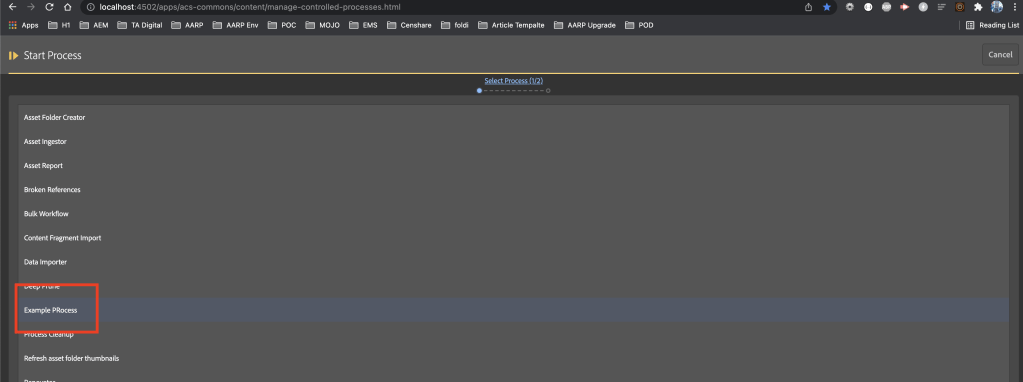
For the MCP process to pick up your new process, you need to create a service that implements ProcessDefinitionFactory and override the getName method to provide the process name to show under the list of processes.

MCP process list

createProcessDefinitionInstance to create a new instance of this process.

package com.mysite.mcp.process;

import org.osgi.service.component.annotations.Component;
import com.adobe.acs.commons.mcp.ProcessDefinitionFactory;

@Component(service = ProcessDefinitionFactory.class, immediate = true)
public class ExampleProcessFactory extends ProcessDefinitionFactory<ExampleProcess> {	
	@Override
	public String getName() {
		return "Example PRocess";
	}
	@Override
	protected ExampleProcess createProcessDefinitionInstance() {
		return new ExampleProcess();
	}
}

You can learn more regarding process definition here

Create Process Implementation:

The process implementation class extends ProcessDefinition and you can have multiple form fields to accept the author’s input.

Process Input fields

You can learn more about form fields here

You need to override:

init – to run initialize the process

build process – define the Action and add the description of the process

store report – Basically used to save the action results under the specified path

package com.mysite.mcp.process;

import java.util.ArrayList;
import java.util.EnumMap;
import java.util.List;
import javax.jcr.RepositoryException;
import org.apache.sling.api.resource.LoginException;
import org.apache.sling.api.resource.PersistenceException;
import org.apache.sling.api.resource.ResourceResolver;
import com.adobe.acs.commons.fam.ActionManager;
import com.adobe.acs.commons.mcp.ProcessDefinition;
import com.adobe.acs.commons.mcp.ProcessInstance;
import com.adobe.acs.commons.mcp.form.FormField;
import com.adobe.acs.commons.mcp.model.GenericReport;

public class ExampleProcess extends ProcessDefinition {
	
	private static final String REPORT_SAVE_PATH = "/jcr:content/report";
	private final List<EnumMap<ReportColumns, Object>> reportRows = new ArrayList<>();
    GenericReport genericReport = new GenericReport();
    
    @FormField(name = "Enter Text",
            description = "Example text to be reported",
            required = false,
            options = {"default=enter test text"})
    private String emapleText;
	
	@Override
    public void buildProcess(ProcessInstance instance, ResourceResolver rr) throws RepositoryException, LoginException {        
        genericReport.setName("exampleReport");
        instance.defineCriticalAction("Running Example", rr, this::reportExampleAction);
        instance.getInfo().setDescription("Executing Example Process");
    }
	
	protected void reportExampleAction(ActionManager manager) {
		record(emapleText);
	}
	
	private void record(String emapleText) {
		 final EnumMap<ReportColumns, Object> row = new EnumMap<>(ReportColumns.class);
		 row.put(ReportColumns.SERIAL, 1);
	        row.put(ReportColumns.TEXT, emapleText);
	        reportRows.add(row);
	}

	@Override
    public void storeReport(ProcessInstance instance, ResourceResolver rr) throws RepositoryException, PersistenceException {
        genericReport.setRows(reportRows, ReportColumns.class);
        genericReport.persist(rr, instance.getPath() + REPORT_SAVE_PATH);
    }

    @Override
    public void init() throws RepositoryException {
    }
    
    public enum ReportColumns {
        SERIAL, TEXT
    }
}

you can learn more about the process lifecycle here

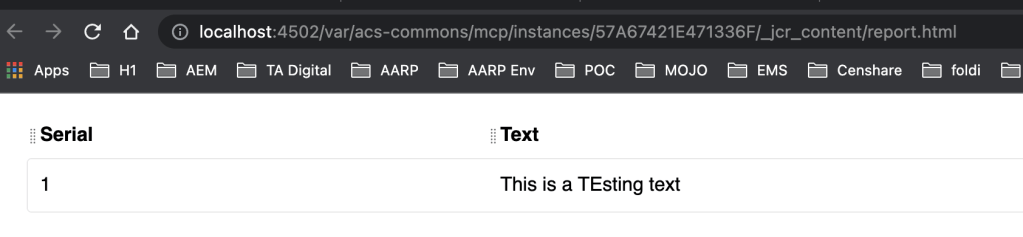
Once the execution is complete we can save and see the report results:

Running Example process
Results page showing Serial and text for the input
References:

https://adobe-consulting-services.github.io/acs-aem-commons/features/mcp/index.html

AEM Invoke API – How to use HTTP Client Factory

Problem Statement:

We have created an HTTP Client factory but how to execute requests and handle responses?

Requirement:

Show some examples to build the request and make a request to the external system and handle the response.

Introduction:

HTTP Client factory is an OSGi Service that creates an HTTP connection based on the external system based on the domain and connection configuration.

In order to use this service,

Build URI:

we need to build the key value map using NameValuePair and add these params to URIBuilder. Once the request is created

@Override
  public String buildURL(@NotNull String apiEndpointURI, boolean buildExternalLink,
    Map < String, String > parameterMap) throws MalformedURLException {
    if (MapUtils.isNotEmpty(parameterMap)) {
      URIBuilder builder = new URIBuilder();
      List < NameValuePair > nvpList = new ArrayList < > (parameterMap.size());
      parameterMap.entrySet().stream()
        .filter(entry -> StringUtils.isNoneBlank(entry.getKey(), entry.getValue()))
        .forEach(entry -> nvpList.add(new BasicNameValuePair(entry.getKey(), entry.getValue())));
      return returnApiEndpointURI(apiEndpointURI, buildExternalLink, builder, nvpList);
    }
    return returnApiEndpointURI(apiEndpointURI, buildExternalLink, null, null);
  }

  private String returnApiEndpointURI(String apiEndpointURI, boolean buildExternalLink,
    URIBuilder builder, List < NameValuePair > nvpList) {
    if (buildExternalLink) {
      return StringUtils.join(httpClientFactory.getApiStoreLocatorHostName(),
        httpClientFactory.getExternalURIType(), apiEndpointURI,
        null != builder ? builder.addParameters(nvpList).toString() : StringUtils.EMPTY);
    } else {
      return StringUtils.join(apiEndpointURI,
        null != builder ? builder.addParameters(nvpList).toString() : StringUtils.EMPTY);
    }
  }

Make a Request:

we can make use of request methods like POST

String responseString = httpClientFactory.getExecutor().execute(httpClientFactory.post(buildURL(apiEndPointURI, false, params)).addHeader("Content-Type", contentType)).handleResponse(HANDLER);

Response Handler:

Get the response and handle the request using StringObjectResponseHandler.

package com.mysite.core.http.impl;

import java.io.IOException;
import org.apache.http.HttpResponse;
import org.apache.http.client.ClientProtocolException;
import org.apache.http.client.ResponseHandler;
import org.apache.http.client.utils.HttpClientUtils;
import org.apache.http.impl.client.BasicResponseHandler;

/**
 * Handling response using Basic response Handler
 */
public class StringObjectResponseHandler implements ResponseHandler < String > {

  private BasicResponseHandler handler = new BasicResponseHandler();

  @Override
  public String handleResponse(HttpResponse httpResponse) throws
  ClientProtocolException,
  IOException {
    String responseString = handler.handleResponse(httpResponse);
    HttpClientUtils.closeQuietly(httpResponse);
    return responseString;
  }
}

Complete file for implementation:

package com.mysite.core.services.impl;

import com.drew.lang.annotations.NotNull;
import com.mysite.core.http.impl.StringObjectResponseHandler;
import com.mysite.core.services.APIInvoker;
import com.mysite.core.services.HttpClientFactory;
import org.apache.commons.collections4.MapUtils;
import org.apache.commons.lang3.StringUtils;
import org.apache.http.NameValuePair;
import org.apache.http.client.ClientProtocolException;
import org.apache.http.client.utils.URIBuilder;
import org.apache.http.message.BasicNameValuePair;
import org.apache.sling.api.servlets.HttpConstants;
import org.osgi.service.component.annotations.Component;
import org.osgi.service.component.annotations.Reference;
import org.slf4j.Logger;
import org.slf4j.LoggerFactory;
import java.io.IOException;
import java.net.MalformedURLException;
import java.util.ArrayList;
import java.util.List;
import java.util.Map;

@Component(service = APIInvoker.class)
public class ExampleAPIInvoker implements APIInvoker {
  private static final Logger LOGGER = LoggerFactory.getLogger(ExampleAPIInvoker.class);
  private static final StringObjectResponseHandler HANDLER = new StringObjectResponseHandler();

  @Reference
  private HttpClientFactory httpClientFactory;

  @Override
  public String invokeAPI(String apiEndPointURI, String httpMethod, Map < String, String > params,
    String bodyText, String contentType) {
    try {
      if (StringUtils.isNotEmpty(bodyText)) {
        LOGGER.info("API Request Params {}", bodyText);
      } else {
        LOGGER.info("API Request Params {}", params);
      }
      if (StringUtils.equalsAnyIgnoreCase(httpMethod, HttpConstants.METHOD_POST) &&
        StringUtils.isEmpty(bodyText)) {
        String responseString =
          httpClientFactory.getExecutor().execute(httpClientFactory.post(buildURL(apiEndPointURI, false, params)).addHeader("Content-Type", contentType)).handleResponse(HANDLER);
        return responseString;
      }
    } catch (MalformedURLException exception) {
      LOGGER.debug("MalformedURLException while invoking API, {}", exception.getMessage());
    } catch (ClientProtocolException exception) {
      LOGGER.debug("ClientProtocolException while invoking API, {}", exception.getMessage());
    } catch (IOException exception) {
      LOGGER.debug("IOException while invoking API, {}", exception.getMessage());
    }
    return StringUtils.EMPTY;
  }

  @Override
  public String buildURL(@NotNull String apiEndpointURI, boolean buildExternalLink,
    Map < String, String > parameterMap) throws MalformedURLException {
    if (MapUtils.isNotEmpty(parameterMap)) {
      URIBuilder builder = new URIBuilder();
      List < NameValuePair > nvpList = new ArrayList < > (parameterMap.size());
      parameterMap.entrySet().stream()
        .filter(entry -> StringUtils.isNoneBlank(entry.getKey(), entry.getValue()))
        .forEach(entry -> nvpList.add(new BasicNameValuePair(entry.getKey(), entry.getValue())));
      return returnApiEndpointURI(apiEndpointURI, buildExternalLink, builder, nvpList);
    }
    return returnApiEndpointURI(apiEndpointURI, buildExternalLink, null, null);
  }

  private String returnApiEndpointURI(String apiEndpointURI, boolean buildExternalLink,
    URIBuilder builder, List < NameValuePair > nvpList) {
    if (buildExternalLink) {
      return StringUtils.join(httpClientFactory.getApiStoreLocatorHostName(),
        httpClientFactory.getExternalURIType(), apiEndpointURI,
        null != builder ? builder.addParameters(nvpList).toString() : StringUtils.EMPTY);
    } else {
      return StringUtils.join(apiEndpointURI,
        null != builder ? builder.addParameters(nvpList).toString() : StringUtils.EMPTY);
    }
  }
}

Create REST service using HTTP Client factory

Check this out URI